



Happy 1 Month Birthday Muse!
Meta Muse has only been out 35 days, having launched on September 8th. In that time, it’s become top of mind with brands and retailers as the buzz has surged and we’ve got a whole new ‘agentic channel’ to think about this close to BFCM.
Since then, we’ve been poking and prodding at Muse to figure out how it works. Good news, we have some conclusive proprietary findings that we’re sharing today that provide actionable and clear best practices for optimizing your products to show up and be recommended by Muse.
Guide to this Series
This is Part 1 of a 2 part series:
Part 1: How to optimize your products for Muse - We reveal the 5 Muse Optimization Best Practices you can implement today.
Part 2: What’s all the buzz about? In Part 2 we look at the various signals that Muse is catching on with consumers and look at detailed usage data.
Usually in Retailgentic, we build up to a conclusion. Given the importance of this one and the fact we’re only 44 days out for Thanksgiving, we decided to flip the script and start with the conclusion first and then show you how we got there, then why it matters in reverse.
Introducing the Five Best Practices for Muse Optimization
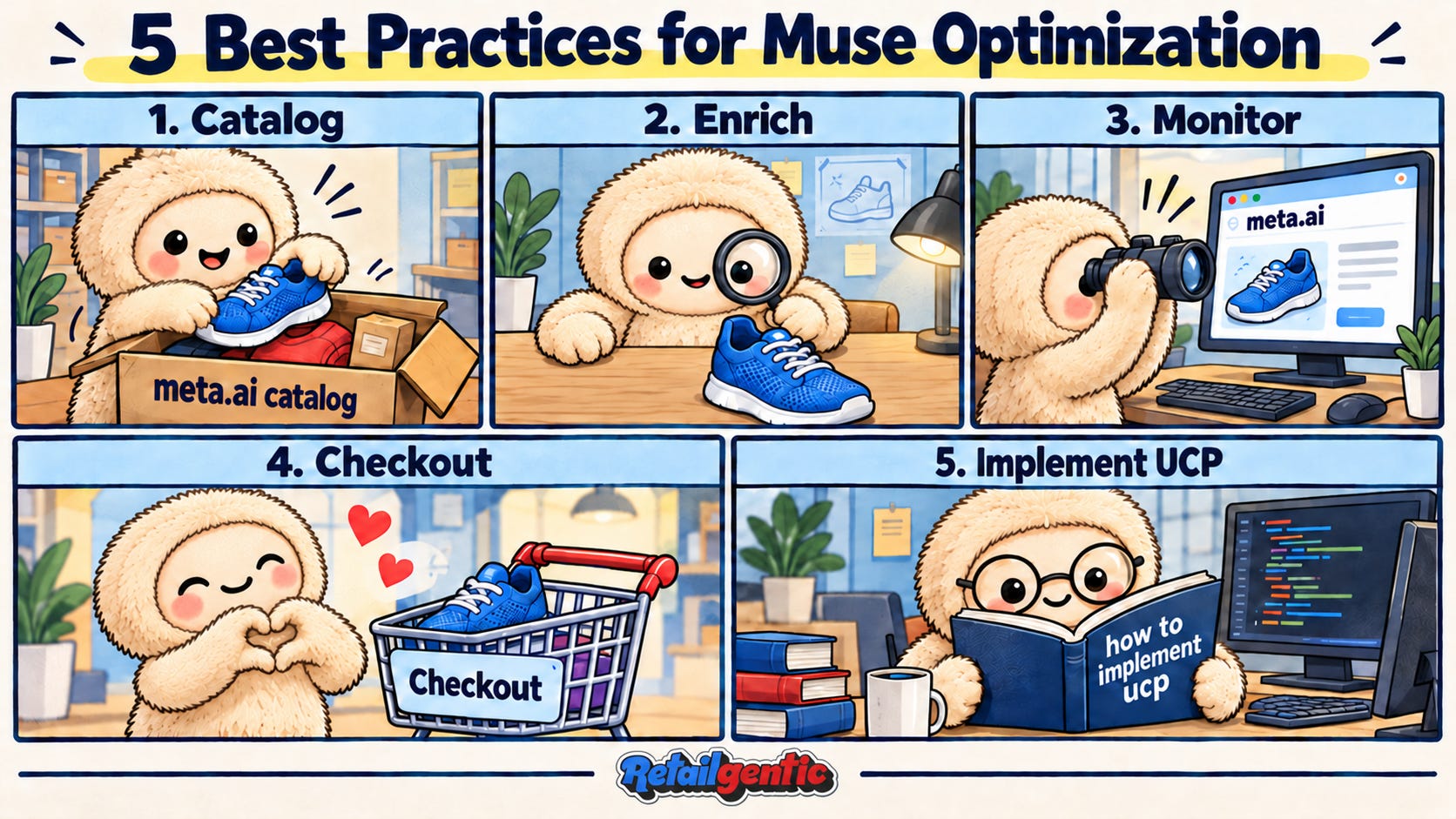
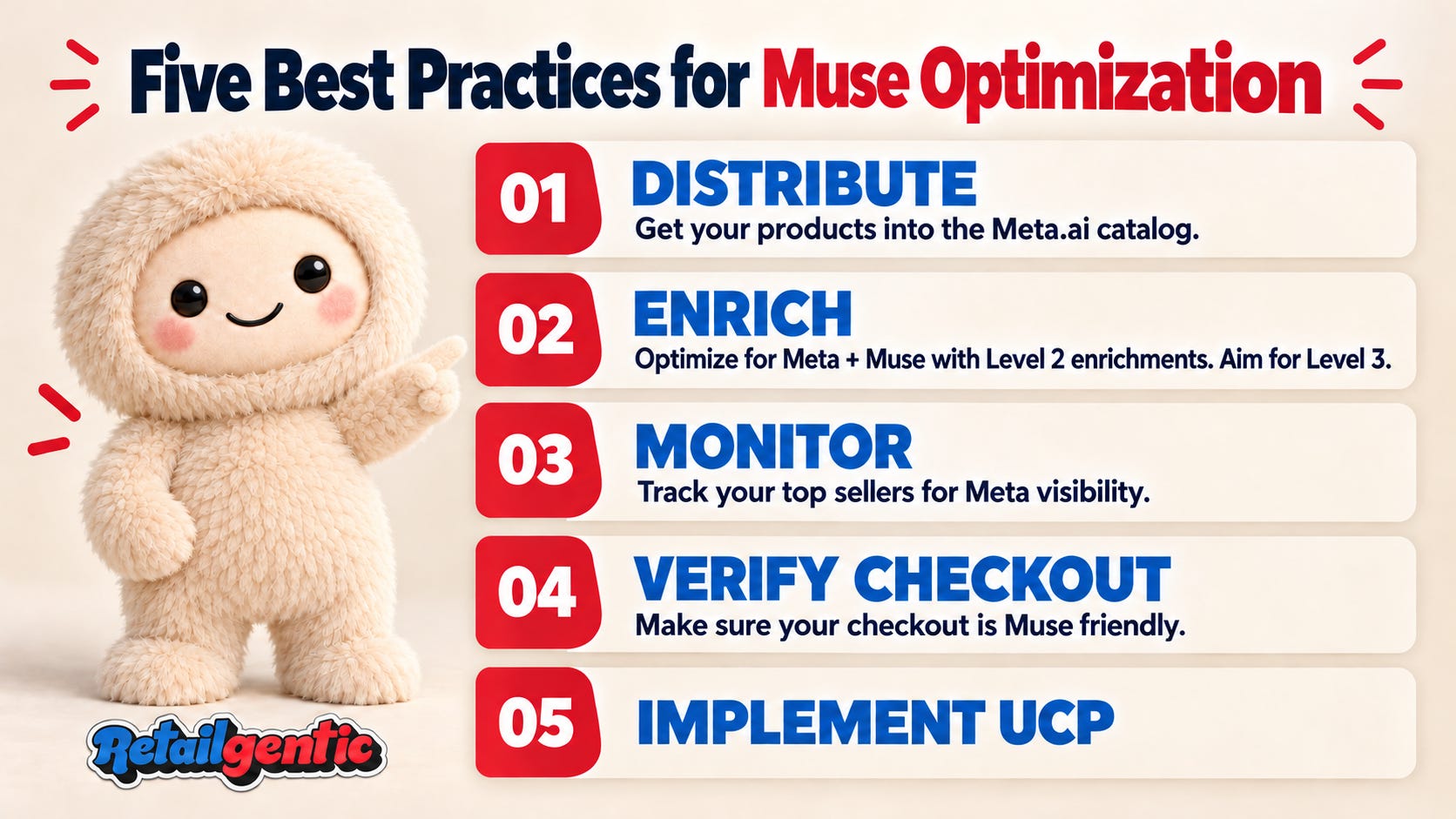
Our deep analysis of how Muse works produced five clear best practices for optimizing your products to be discovered by Muse. Here are the five best practices, the rest of the post shares our findings that led to and support each of the five best practices:
Catalog - Retailgentic proprietary research discovered that Muse pulls its catalog primarily from the Meta.ai product catalog. There are three other sources of catalog data: Shopify Catalog API, UCP and crawling. The bulk of SKUs are sourced through the Meta.ai catalog. Conclusion - if you aren’t using Shopify* you should make sure your products available in and optimized for Meta.ai.
Enrich - Both Meta.ai and Muse, being part of the Facebook family, know a lot about their users, the ‘intent gap’ between shopper intent and product intent is quite large. To make sure Muse can recommend your product for the high-intent shopper, like with other LLM-based Agentic Channels, the biggest gap is going to be in product data - who are your products designed for, the use case, etc.
Monitor - You can’t improve your Muse sales without monitoring. Because Muse discovery is primarily driven by the Meta.ai catalog, you can get a two-for-one by measuring your product card level visibility and quality there vs. Muse which is much harder to monitor.
Checkout - Beyond discovery, to capture the transaction, unless you are on Shopify, you need to verify that your infrastructure layer and guest checkout are Muse friendly. We’ll give you a step-by-step example of how to do this.
UCP - We see evidence that Muse /Meta are using UCP for discovery, and checkout - but primarily for Shopify. If you aren’t on Shopify, we believe this is coming soon, maybe exclusive tot he Muse Connector program.
That’s your ‘cheat sheet’, each section below digs into the ‘how we know’, the ‘why’ and the ‘how’ - how to implement each of these best practices.
Muse Best Practice 1: Catalog Discoverability
I want to first, thank Vedant Gupta on our team, he did the leg work on the CSI work for Muse. If you like this more technical side of things, he’ll be posting more details on LinkedIn shortly.
In a nutshell - it turns out that Muse is a derivative of the OpenClaw system, so you can ask it to see the system files. If you ask your Muse, it will share the system files, that are basically Markdown files that all together define the Muse ‘harness’ (we covered harnesses in part 1 of our personal agent series here). In the Muse operating system there is a very specific shopping skill that lives in a human readable markdown file (shopping-SKILL.md).
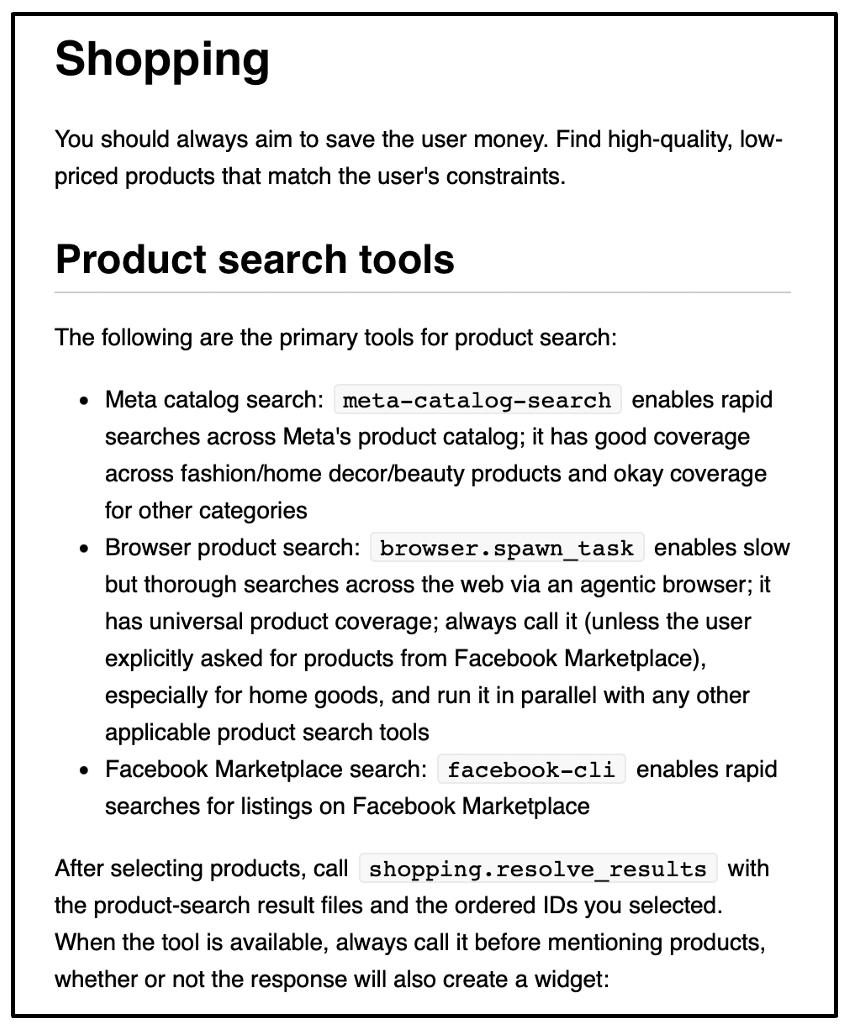
These ‘primary tools’ are where our CSI work ends, but the knowledge in this skill file gives us enough to throw the right shopping-related prompts at Muse and figure out what’s going on inside the ‘meta catalog search’. Before we jump into that, note these parts of the shopping-SKILL.md file:
The skill explicitly tells the agent to focus on low prices, but also to consider the ‘constraints’ (another word for context - e.g. did the user ask about features, color, size, location)
There are three top-level pools of inventory:
Meta catalog search - we are opaque to the details inside this tool.
Browser product search - you’ll note the ‘universal product coverage’ verbiage here and it also suggests the meta catalog search is particularly weak for ‘home goods’. Besides this contextual logic, we can not see inside the browser product search tasks.
FB Marketplace - This internal tool provides the rapid search of facebook marketplace.
For our purposes we can ignore FB Marketplace (FBM) - it only pops up for collectible, furniture, auto and other requests where FBM has a large local inventory set. Note that FB blocks crawls of FBM, so this is proprietary inventory only available to Muse. Like Amazon, Meta is simultaneously, relying on crawling the internet, but blocking its own assets from crawl.
Hypothesis and Results from our Meta.ai and Muse Prompt Test
The name of the first skill, meta catalog search, gives us a clue of the source of a large part of Muse’s internal catalog. The word ‘Meta’ is right there. Waaay back in March, we were the first to report that their chatbot, Meta.ai, was live with product cards (here)
Our hypothesis: Why would Meta build TWO product catalogs - why not use the one they revealed in March and have been working on and making improvements to all that time. Logically you would leverage the Meta.ai catalog. To test the hypothesis, we built a testing framework to run product-level prompts against Meta.ai and Muse and compared the results. The results:
89% of the time when a test product appeared in Meta.ai’s top three results, Muse also showed it. The conclusion from this data is that Muse’s top source for product information is Meta.ai (it says as much in the skill, we wanted verification). The crawl is a catch all for any missed great deals/products and updating/verifying what’s in the Meta.ai catalog.
73% of the time, prompts returned at least one listing witht he same product title and seller on both platforms - another indication there is a lot of overlap in Meta.ai’s product catalog and Muse.
Where the differences come in is by its nature and with connectors (email/calendar/etc), the agent has more context and that seems to be part of where the 11-27% delta in there comes from. There’s also the ‘universal product coverage’ mention in there. We do know that Muse and Shopify announced a deal and our tests also indicate that inside of the skill, (not clear/known if it’s from the Meta.ai side or the Muse skill), Muse is utilizing the UCP protocol to browse products as well - this is definitely the case for Shopify stores, and we believe that it’s generally available for anyone.
Discovery: Putting it all together
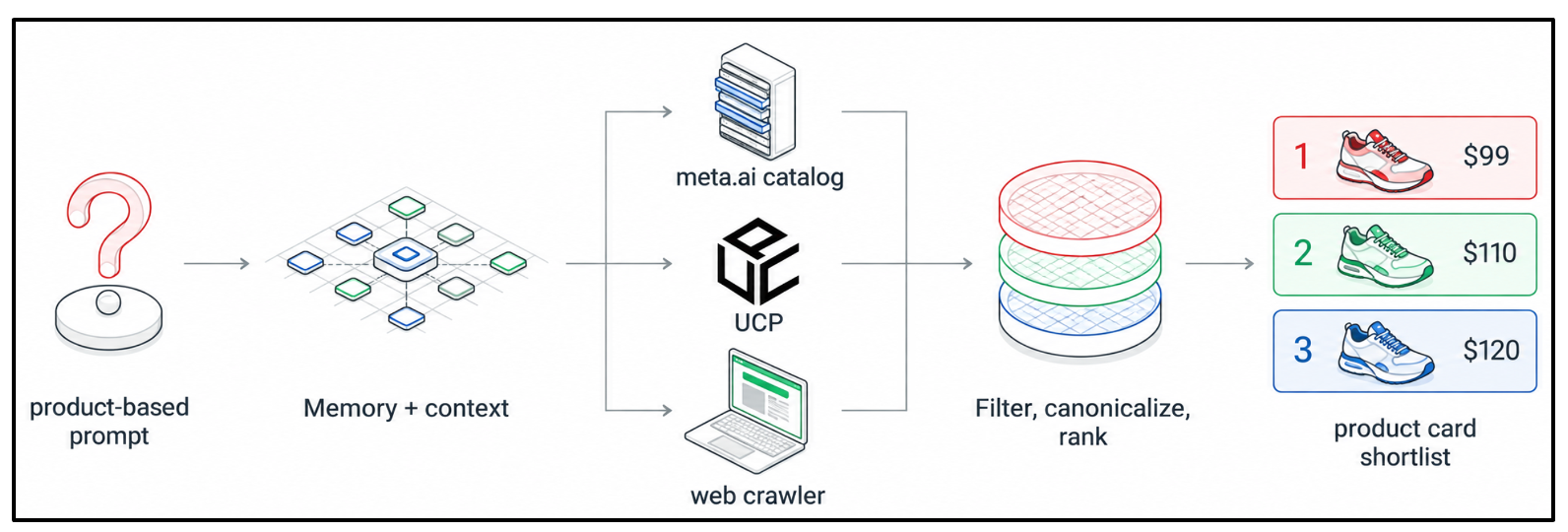
Here’s what happens:
The user sends the Meta agent a prompt that’s determined to be product-based
The shopping skill swirls together:
the prompt
context from agentic user history
low price focus as per the skill
any other criteria
In parallel, the Muse agent’s skill pulls products from:
The meta.ai catalog
UCP
Web crawler
The products from the three are combined, canonicalized and ranked and delivered to the user
Finally, a (usually low price at top) short list of products is produced
Discovery Conclusion: Meta.ai
Based on our research, if you want to do one thing to increase your Muse discoverability, it boils down to: Make sure your products are available in Meta.ai. Since 2015, Facebook has taken datafeeds from their version of a merchant center called Meta Commerce Manager. That gives your products a direct line into Meta.ai and, as we now know - right into the Muse agent.
Meta.ai will get you 90% of the way - for bonus points if you want to implement UCP and make sure your products are crawlable it will help your odds. But having a product available for selection is only part of the discovery puzzle, what we’ve learned from this exploration is that you have to bridge the gap between the massive shopper context and the typically under-contexted product catalog.
Note: There’s a LOT more to the shopping skill detailed in the markdown file, but for brevity we haven’t gone into the detail because 90% of what a merchant needs to optimize Muse is what we covered. If you want to download your Muse’s shopping MD file, DM and I will send you the prompt - we assume it’s copyrighted so do not provide it here.
This brings us to Best Practice 2.
Muse Best Practice 2: Enrich
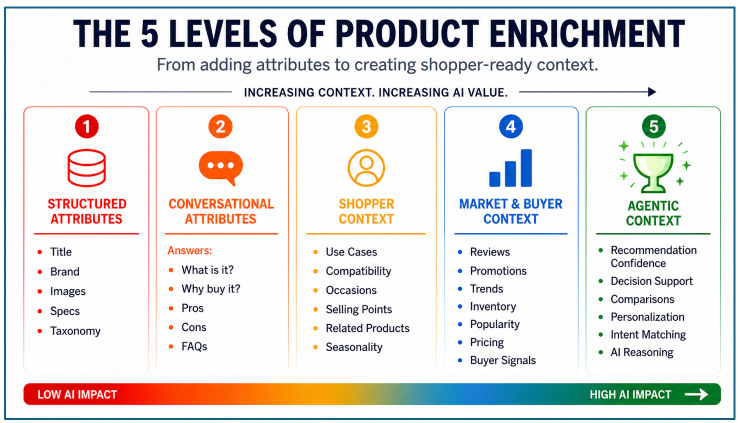
As a reminder, back in July in this post→

we introduced the concept that not all ‘enrichments’ are the same, in fact we have identified 5 levels. Unfortunately many brands work with PIMs that have an enrichment feature. That’s what we call Level 1 enrichment. That’s the basics for pre-2022 era optimization. In the Agentic era it’s now a ‘must have’, but it’s not enough. For Muse type operation you need at least what we call ‘Level 2 - Conversational Attributes’. Ideally, we recommend ‘Level 3 - Shopper Context’.
Why?
Remember this box from our discovery diagram above:
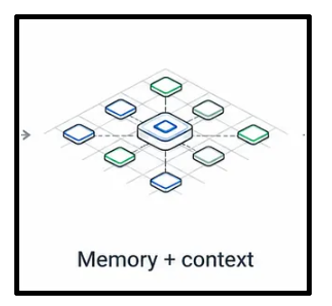
As people are using agents, the agent typically has access to their email, which pulls in shopping history, their past conversations, their travel, their health information. They know if the outfit is for an event, they know the trip the customer is going on, they know the preference of the customer to buy beauty products with a jasmine scent. But without YOU telling it, it will NOT know:
Answers to FAQs about your products
Why people love your product
The occasion your product is great for
Your product’s scent profile
Your product’s target use case
What do you say about negative reviews? Is there new product packaging, a new formulation, directions not always followed, fit details?
The list can be long, but as we’ve pointed out previously, you can use agentic commerce to surface contextual clues about what all ACO surfaces don’t understand about your product (we call this context capture) and use that to prioritize this list.
In fact, long-time readers of Retailgentic are in a great position for Muse optimizations, because, like all other Agentic Commerce surfaces, our 11 step framework is 100% applicable.
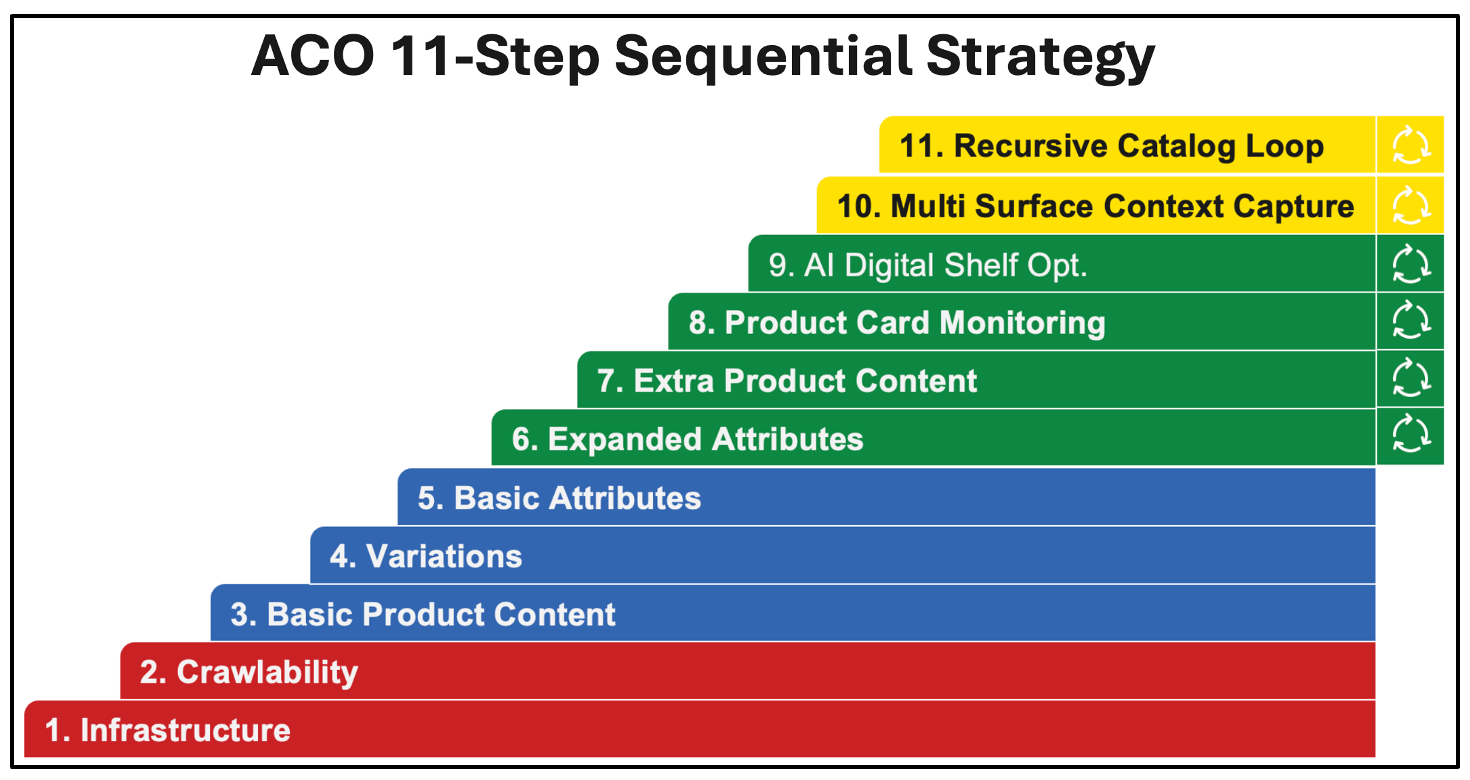
Leveraging Meta.ai to get your products into Muse is a shortcut that let’s you skip steps 1 and 2 and go straight to 3+.
A Note for Shopify Merchants
It’s our point of view that what Shopify’s catalog provides enrichment-wise and distribution wise is fine for smaller < $20m/yr merchants which is 95% of their customer base, but for larger merchants, as detailed in this post from August, the enrichments are Level 1-2 and the ‘clustering’ and ‘compression’ may not result in the representation and agentic optimization of your products that advanced merchants would want. In that post we detailed our free utility - Shop Cat Explorer (here) that allows you to see exactly how an agent like Muse sees your catalog via the Shopify Catalog UCP endpoint.
Muse Best Practice 3: Monitor
Another point we’ve been discussing since inception is the importance of a closed-loop optimization system. For Muse Optimization Best Practice 3 - Monitor, the nuance is with Muse it is extremely hard to repeatedly monitor a set of products because of the pesky power of its memory. There is no ‘temporary chat’, but since we now know that the bulk of the Muse catalog is coming from Meta.ai, you can loop on that and get 90% there, saving prompts on Muse for the last 10%.
What you’re monitoring here is:
Are your products showing up on Meta.ai for product-level prompts, product-constrained prompts, feature-level prompts, category prompts, and broader AEO/GEO prompts.
Are your product cards correct? Do they have the right price, features, variants, attributes, etc.? Are you happy with the hero image? Do they land on the right page?
Verify the checkout isn’t blocked, which brings us to ‘Best Practice 4’…
Muse Best Practice 4: Checkout
In the shopping skill, there are details for us about how Muse purchases products:
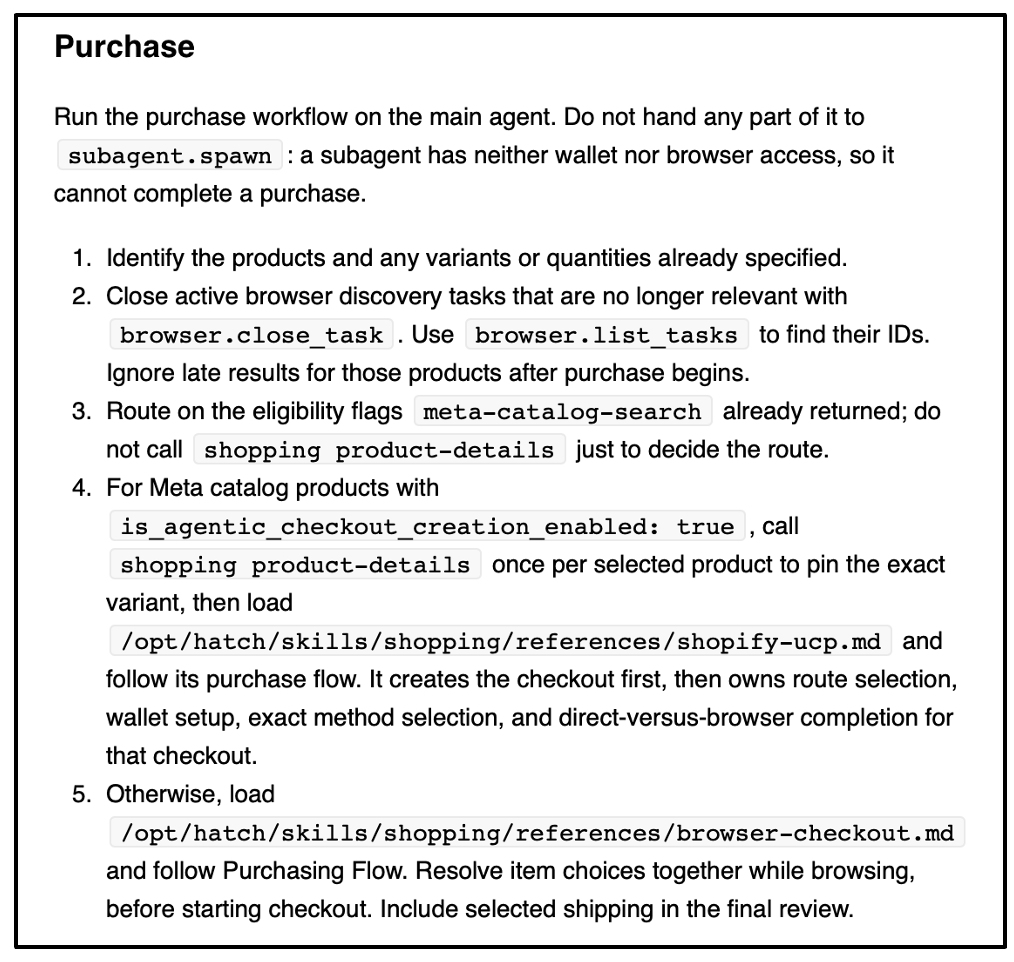
Parts 1,2 and 3 are implementation details. The meat is in instructions 4 and 5. It basically says - if this is a Shopify product, checkout via UCP, otherwise, go through the guest checkout and use Link.
Therefore, there are two steps here:
If you are on Shopify, verify that everything works and is wired correctly for both Shop Pay and Link.
If you are not on Shopify, on a regular basis have Muse run through your checkout to make sure there are no blocks on enabling the agent to checkout on the consumer’s behalf
Muse Best Practice 5: UCP
We put this last, because it’s a bit of speculation mixed with what we know:
We know that Muse ‘speaks’ the UCP protocol because it’s crystal clear from the shopping skill, it is making a tool call that uses both the UCP powered catalog discovery and the checkout.
We’re speculating that the connectors unlock a Muse/Meta implementation of UCP that you would imagine would be as close to Google Gemini’s as possible to minimize merchant work and maximize time to Muse availability.
Therefore, our last best practice, while not a requirement is an investment in the Muse future and you get Google Gemini - think of it as a BOGO.
What about the Muse Connectors?
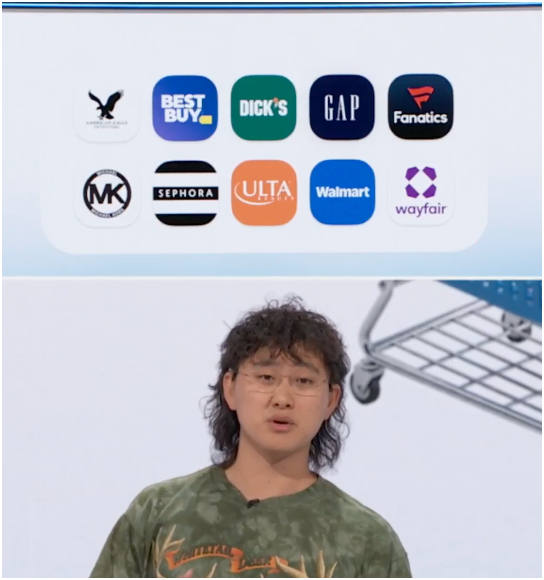
On 9/23/26 at Meta Connect, Meta announced 10 retailers as part of an inaugural class of Retailers with ‘Muse connectors’.
The retailer partners announced (in addition to the launch partner of Shopify) are:Walmart, Best Buy, American Eagle Outfitters, DICK’S Sporting Goods, Fanatics, Gap, Michael Kors, Sephora, Ulta, and Wayfair.
None of these are live yet, so we can only speculate on what this means. Based on past connector programs for ChatGPT, etc. Most likely it includes:
A discovery component - I would imagine via UCP or datafeed
A checkout component - almost certainly a UCP-powered checkout
Wall St is speculating a revenue share type agreement
Potentially advanced features such as multi-cart, loyalty program integration, participation in a BFCM deals program, etc.
We will report back when these are live.
Muse Shopify Shop Pay Integration is Live!
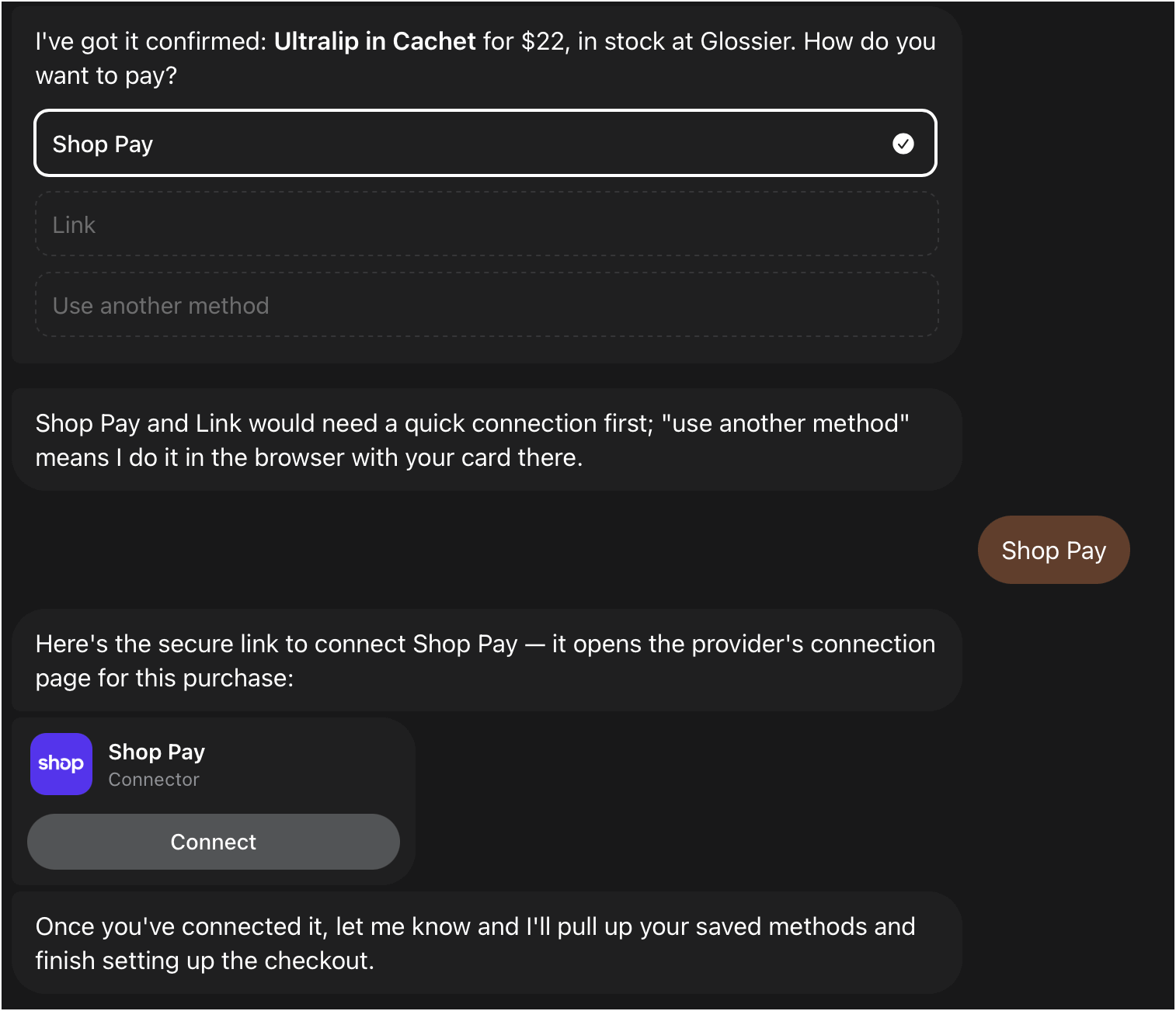
We have been able to checkout using Shopify Shop Pay - offered as an option next to Link, this is live now. For example, on the Glossier store. Here’s what it looks like:
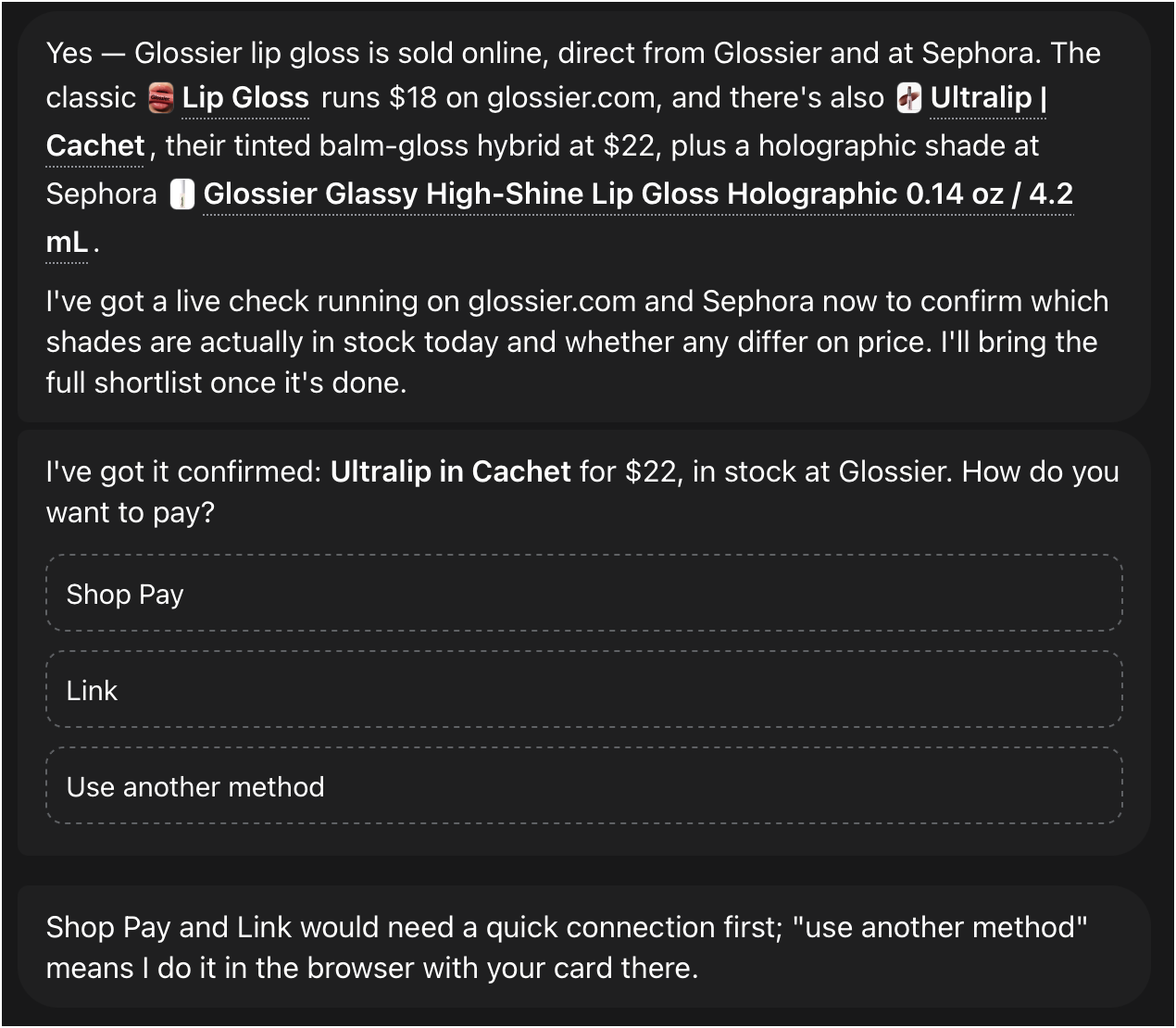
Clicking Shop Pay leads to a typical Shop Pay login flow→
Summary
Between now and BFCM, if you had to do 3 tactical things to optimize for Meta Muse
Distribute your products to the Meta Commerce Manager and verify they are part of the Meta.ai catalog
Level-3 Enrich your top 5 or 10% of SKUs
Verify your checkout isn’t blocked
After that, assuming Muse continues to surge, you can revisit Monitor and implementing UCP.
What’s Next?
In Part 2, we’ll highlight the latest news on Muse - the latest data on scale, usage and just yesterday, Meta dropped a new model, “Muse Wonder” that they have explicitly said will be powering the Muse agent in the near future. Details here on that if you’re interested. The current Muse agent runs on the model called ‘Muse Spark’.
It appears that Meta’s huge bet in their AI reset has worked and they have jumped onto the frontier:
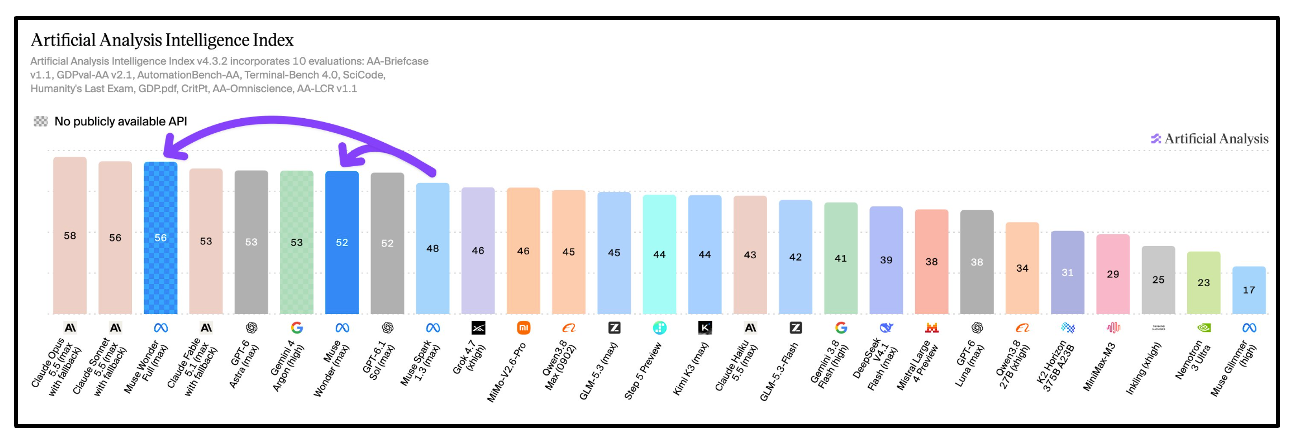
I’ve spent a LOT of time watching Muse Spark do computer use (on the Muse agent harness) vs. Astra, Fable and Opus - it’s very slow compared to those models. I haven’t seen the computer use benchmarks yet, but to jump this high on AAII, I imagine we’re going to see the Spark→Wonder jump in capabilities be a doubling or tripling. Said another way Muse today is very good, but it’s also the worst it’s ever going to be - it is only going to get smarter, faster and more proactive from here.
Next week, we’ll dig into more of that.