


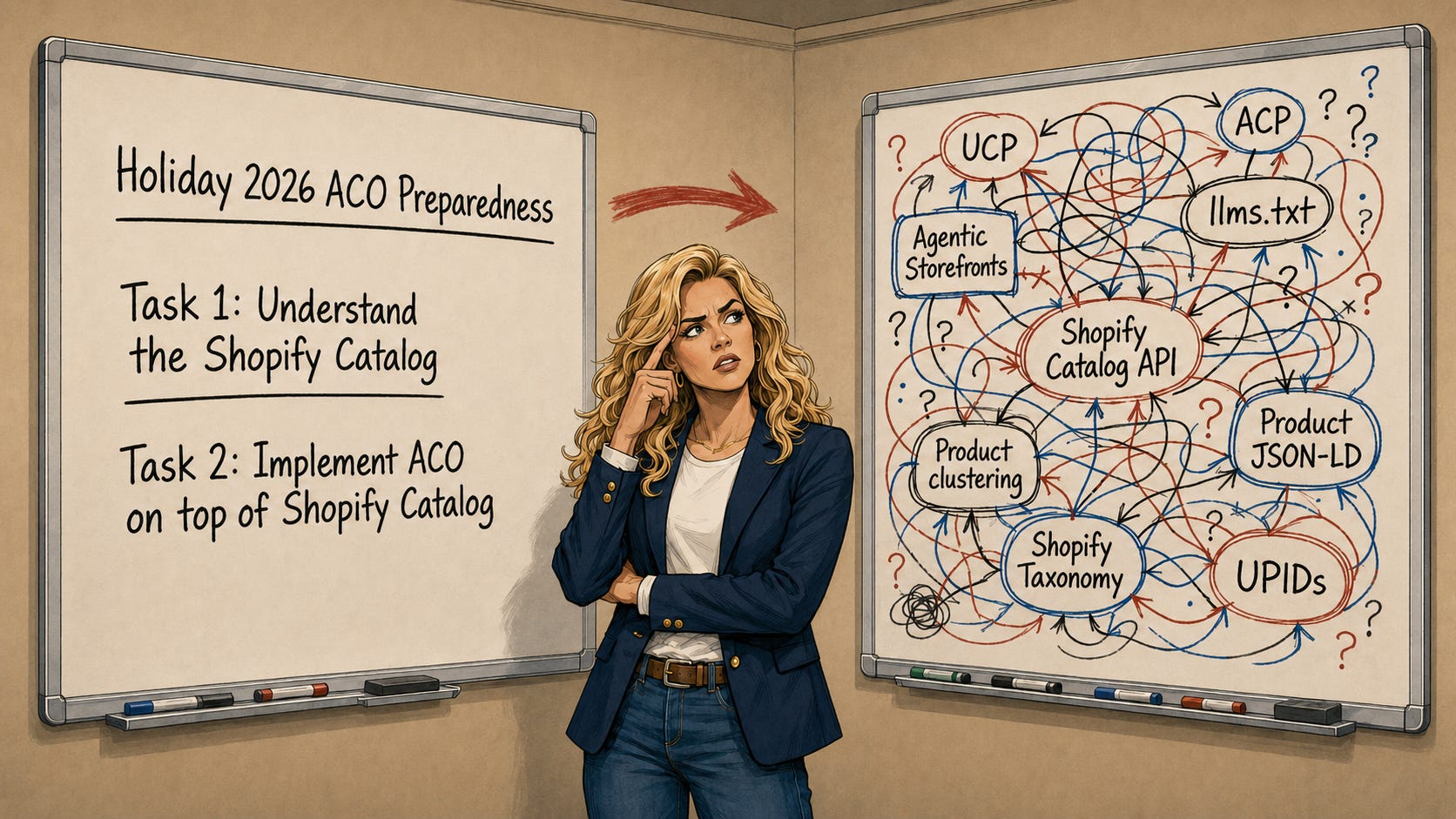
Welcome to the last piece of a two part series where we’re going deep into what Shopify is doing in Agentic Commerce.
8/12: Part 1 - In Part 1, we started by looking at Shopify’s Q2 results through the lens of Agentic Commerce - it’s helpful to understand what makes Shopify ‘tick’ what drives their economic engine (checkout/ShopPay) and specifically what they said about Agentic Commerce. Available Here.
8/25: Part 2 - In Part 2, we’re diving deep into Shopify’s Agentic Catalog offering. We’ve talked to hundreds of larger Shopify store operators and there is a LOT of confusion and misunderstanding around what Shopify Catalog does and doesn’t do and how it does it.
Part 1 Recap
In part 1, we looked at Shopify’s strong Q2 through an Agentic Commerce lens and the agentic commerce data was impressive:
AI-driven traffic to Shopify stores grew 3x y/y.
Orders originating from AI searches grew 3x y/y.
New-buyer orders from AI channels came in at nearly 2x the rate of other channels.
Half of AI-referred sessions landed directly on a product detail page, 2.5x the rate of traditional search.
75% of AI-attributed orders came from outside Shopify’s top 100 categories.
Shopify also said AI searches powered by Catalog converted at 2x the rate of searches using scraped product data.
That last datapoint is the springboard into today’s deep dive.
We’ve talked to hundreds of larger Shopify store operators and there is a LOT of confusion around Catalog. Is it a product feed? Is it the data already sitting in Shopify Admin? Is it another sales channel? Is it the API developers use? Does every AI engine see it? Can a merchant control it? What happens to all those meta datafields teams have spent years building?
Those are all good questions because Shopify uses the word “catalog” in several different ways.
Before we get super-tactical, let’s look at the strategic picture.
The Shopify Big Picture
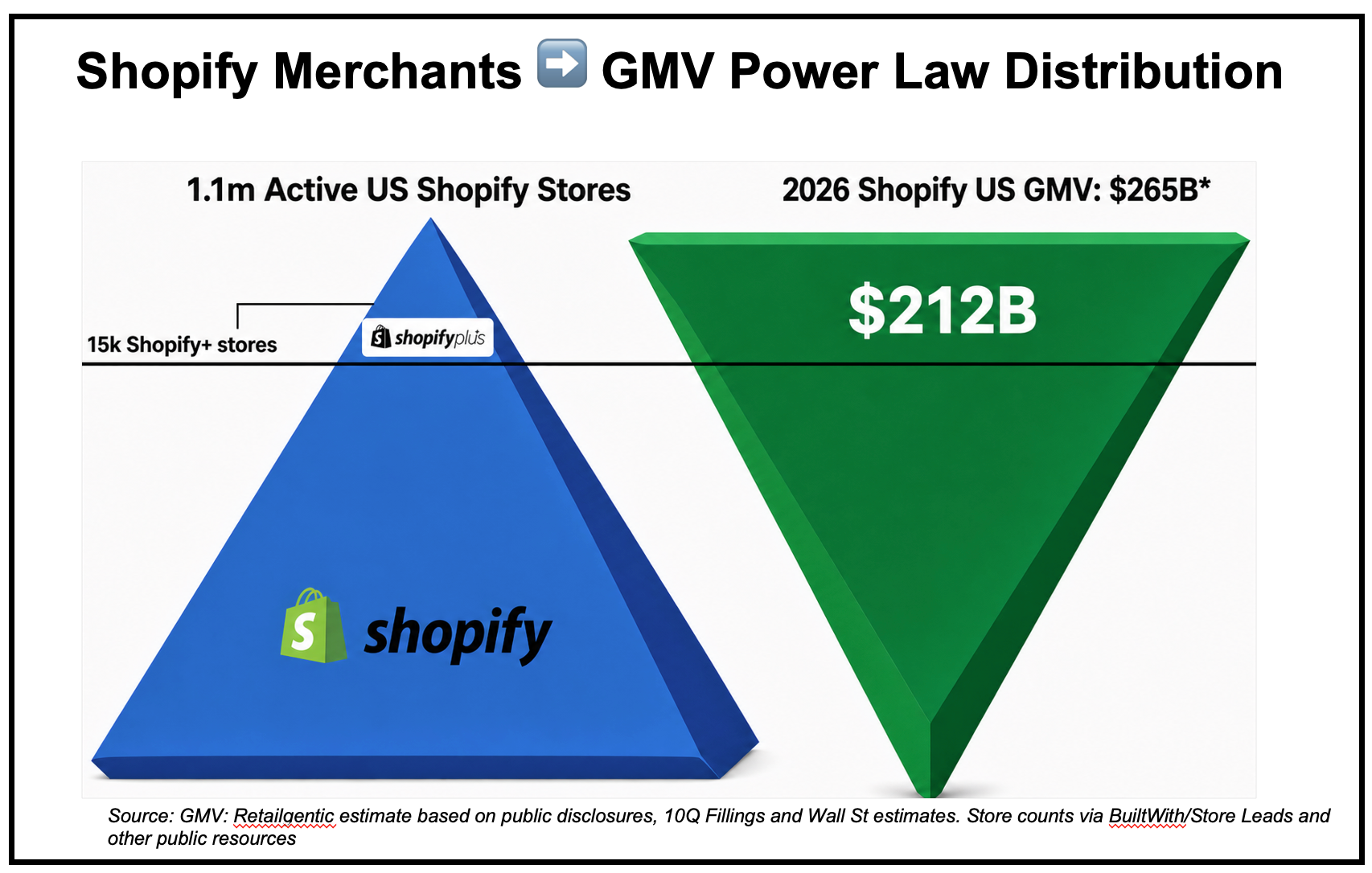
Shopify doesn’t disclose their merchant numbers, regional details for merchants or regional GMV, but you can get very close on both based on public disclosures and Wall St. estimates.
For merchant count, there are 4-5 companies that crawl the internet, scan the html for signals of the underlying technology being used and report details on what they find. According to these services, there are about 3m active Shopify stores globally. Of those 3m stores, 1.1m are in available to US consumers and of THOSE ~15k are the largest stores that use the more enterprise-ready Shopify Plus platform.
On the GMV side, Shopify does disclose GMV quarterly, but not by region, but they give regional growth and some other datapoints annually that make it relatively easy to build a model that’s a good guesstimate. By triangulating on these models our Retailgentic forecast for GMV for 2026 is right at $500B globally. If we take out POS GMV sales and some other pieces and also look at the US, we get a US GMV prediction of $265B for 2026.
Using these numbers - 1.1m US merchants and $265B in 2026 GMV we can then look at the distribution curve.
Merchant Distribution ➡️ Ecommerce Power Law
There are many different distribution curves. A popular distribution curve is a bell curve you’ll potentially remember from college curves. Shopify is an extreme head/tail story. The top 15k (or 1.4%) of stores drive 80% of the GMV ($212B).
That yields:
Top 15k stores average GMV/yr: $14.1m GMV.
Bottom 1,085,000 average $50k/yr GMV.
There are many gradients and tiers that would make this more granular, but this binary comparison gives you a feel for how stark the head and tail of the Shopify merchant base are.
The long tail doesn’t stop there, it’s in the category mix too.
Shopify Category Mix - Another Long Tail
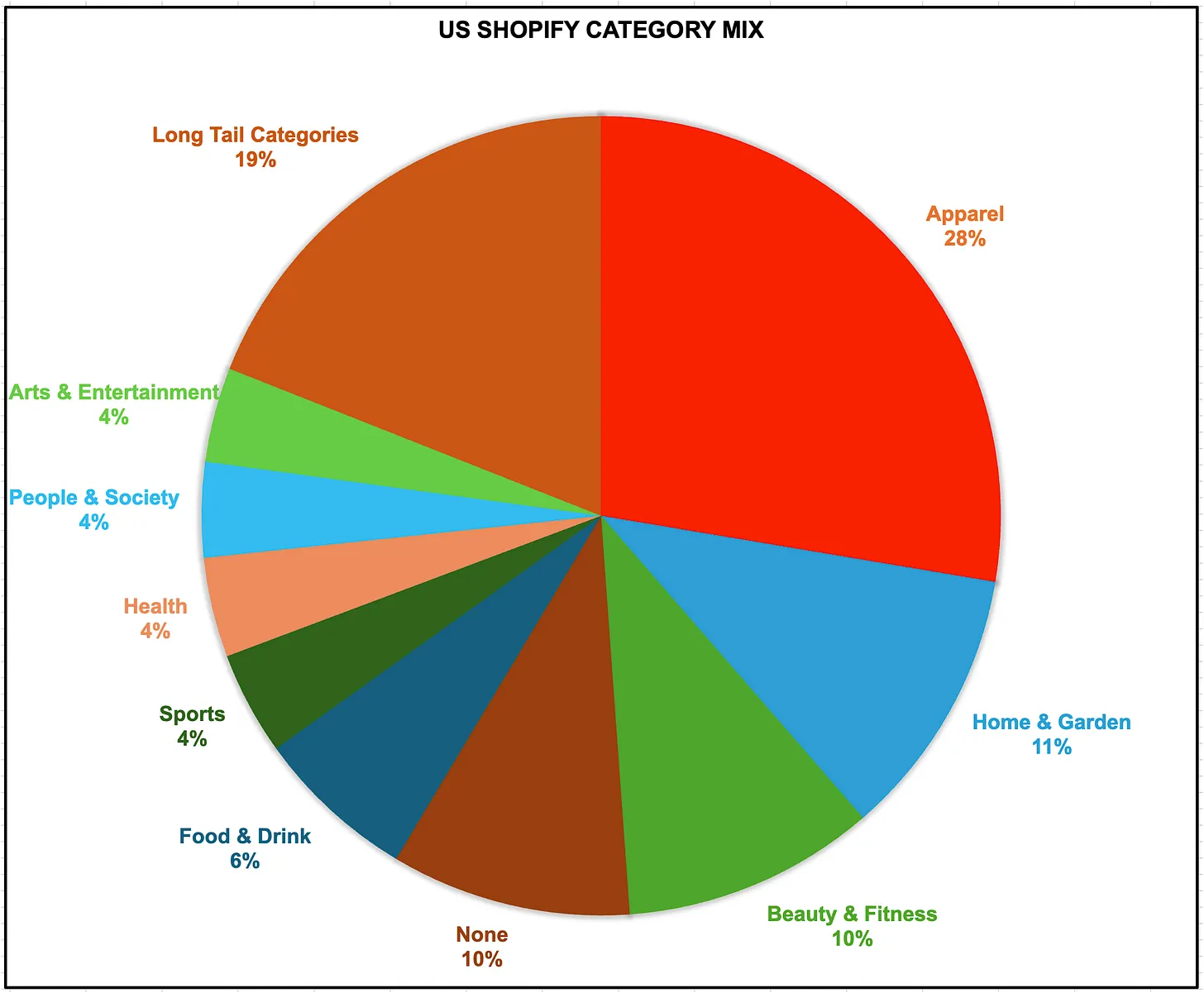
If you look at those 1.1m US stores and put them in general categories you get the pie chart above. The top 3 store categories are:
Apparel (28%)
Home and Garden (11%)
Beauty and Fitness (10%)
From there you’ll see it gets long-tail quickly with 19% of the stores in a category with less than 4% share (marked ‘Long Tail Categories” on the pie chart).
Implications of the Shopify Platform Long Tail
Because they have so many customers with diverse needs, Shopify has to act like a ‘platform’ - finding the center of the bullseye for the majority of their merchant features. On top of that they provide APIs, headless capabilities and the app store which give the merchants that fall outside of that center of the bullseye to build their own solutions.
Said another way, it does not make economic sense to build features just for the 10k largest stores. They do some of that in Shopify Plus, but because the subscription part of their business is now dwarfed by the checkout (tied to penetration of GMV by ShopPay which also favors smaller merchants), there’s increasing incentive misalignment for enterprise-specific features.
As we dig deeper into the Shopify Catalog, features, you’ll see that some of them are not able to be controlled 100% by merchants. While this frustrates many of the largest Shopify users, economically it makes a lot of sense for Shopify to build them this way.
Before we get into the how Agentic Catalog works, we want to introduce a tool that has helped us immensely to understand and visualize how all this works….
Introducing: Shop Cat Explorer
To help understand the Shopify Catalog API and everything made available to agents, because the API is openly available and well documented, I was able to build an ‘Explorer’ App that lets anyone explore the Shopify Catalog on your own. It’s the Shopify Catalog Explorer (SCE), which is a mouthful, so I shortened it to Shop Cat Explorer. The way it works is first go to: https://www.shopcatexplorer.ai and you can start exploring on your own. Here’s a quick getting started guide.
Getting Started with Shop Cat Explorer
SCE has a four-pane user interface:
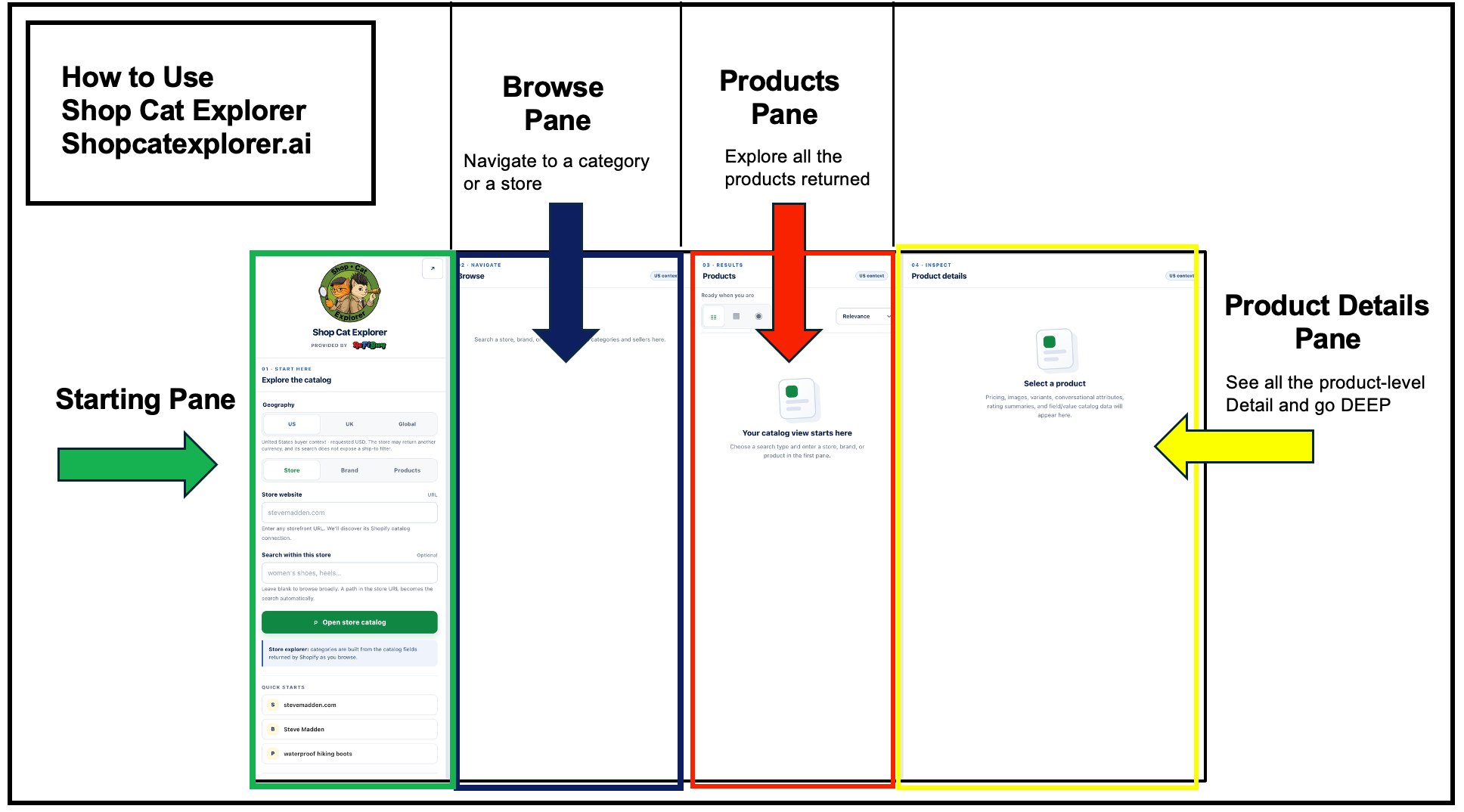
In the Starting Pane, you choose your geography, then if you want to look at the Shopify Catalog API results from a store perspective, a brand view or a product view.
Shop Cat Explorer Scenario One: Store View
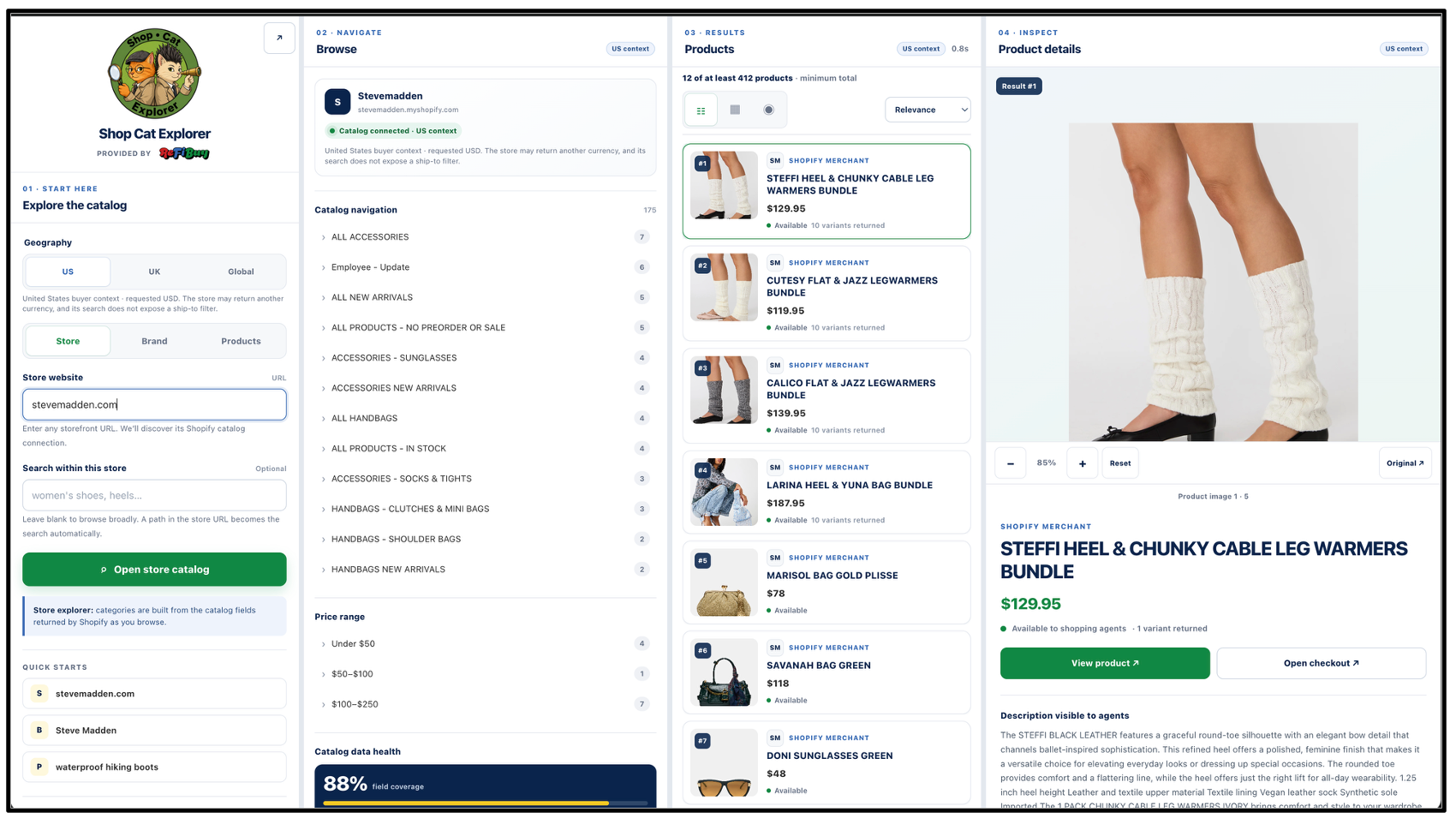
Here we look at the store stevemadden.com which flips the other panes to:
Browse Pane: Shows the store’s categories and price range filter
Product Pane: Here all the products are listed - the top product is ranked by Shopify as the most relevant, and therefore the one the API returns first to the agent and so on. The number of products reported by the agent is at the top of the pane. As you scroll, it could pull more as the API ‘pages’ products.
Product Details Pane : In the product details pane, for the selected product from the Product Pane, you’ll see all the SKU-level detail the API exposes to the agent including:
Product Description
Conversational attributes - These are the “Inferred product fields” (metadata.attributes, metadata.tech_specs, metadata.top_features, metadata.unique_selling_points)
Reviews (summary - like 4.3/5) - We know this is in the catalog API, but rarely surface it - still exploring why not consistent in shop cat explorer..
Reviews - review-level details - we’ve seen these showing up in UCP sometimes, not sure how that’s happening if not supported here, consider this an area we’re still exploring or a WIP.
Variants returned
Agent Visibility Check- Here we check 6 basic attributes and if all 6 available, we mark it ‘not visible’. The 6 attributes are: image, description, price, SKU, Rating, compare-at-price. Note: This is our Shop Cat Explorer algorithm/signal not Shopify’s.
Catalog field/value data - Data for all catalog attributes provided by the API
Shop Cat Explorer Scenario Two: Brand View
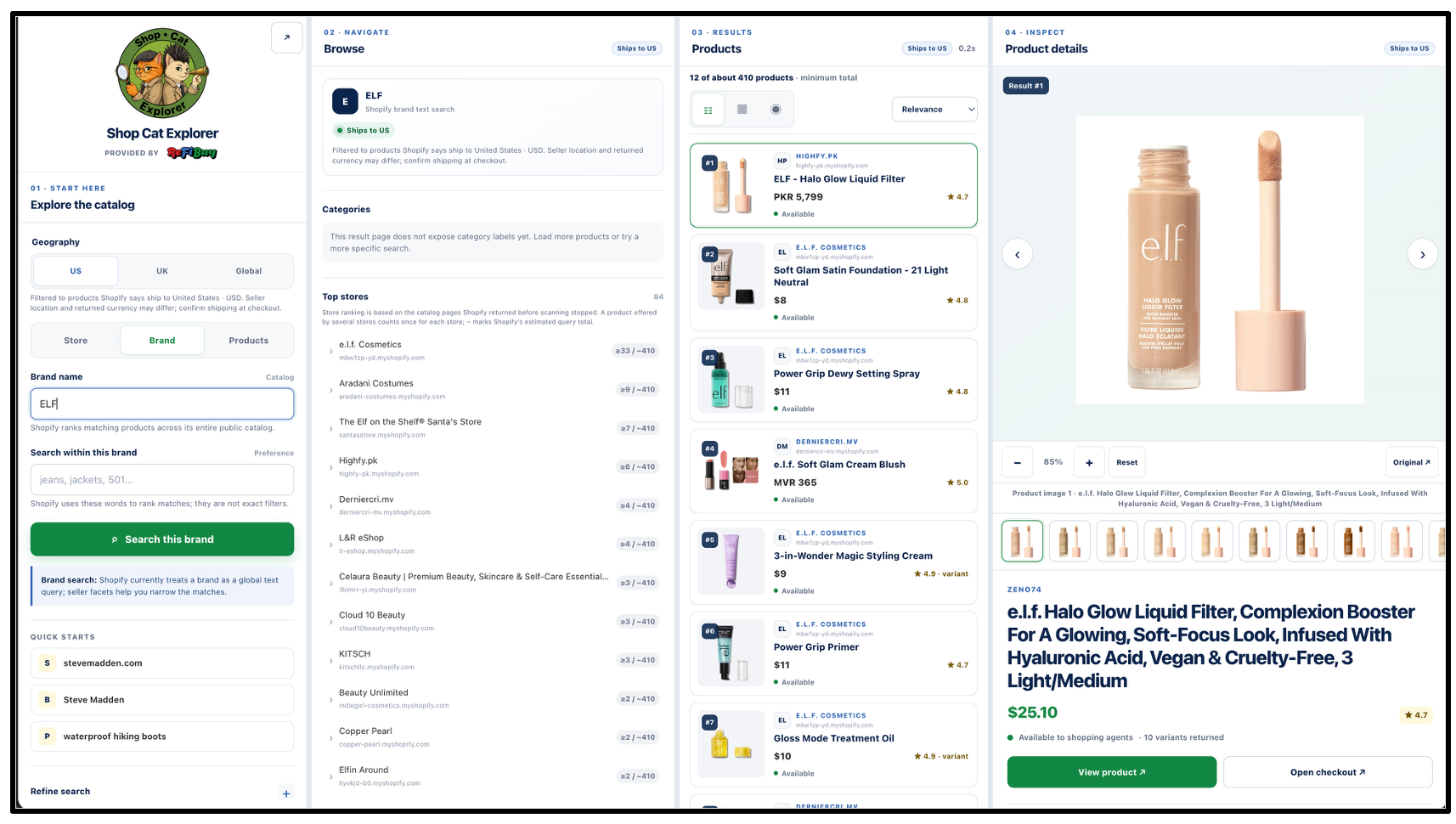
In this example, we look for the beauty brand: ELF, this results in:
Browse Pane - Shows there are 51 stores carrying the brand, and lists the top 12
Product Pane - Shows the ELF products returned from those 51 stores in order from top relevance to least (this is the order sent to the agent calling the catalog API).
Product Details Pane - same information as the store view - the 7 sub-categories of product-level details for the selected product.
Shop Cat Explorer Scenario Three: Product View
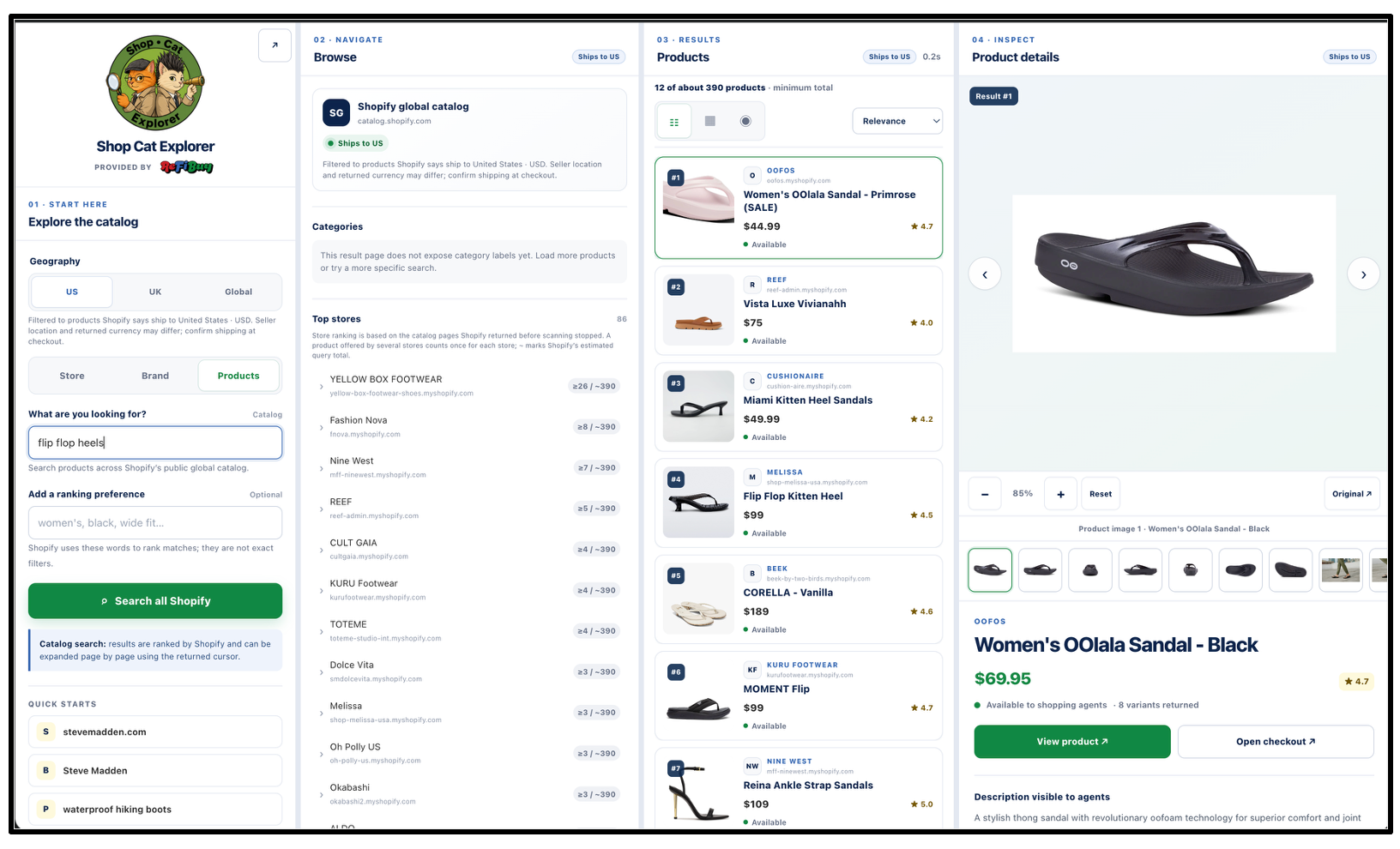
In this example we look for the hottest fashion accessory this Summer: “Flip Flop Heels” and it turns out there are 346 core SKUs across the Shopify Catalog.
Browse Pane - Shows there are 136 stores carrying flip flop heels, and lists the top 12 stores.
Product Pane - Shows the flip flop heels from most relevant to least.
Product Details Pane - same information as the store view - the 7 sub-categories of product-level details for the selected product.
Shopify Catalog - The Basics
There are four parts to the Shopify Agentic Commerce Stack. They are:
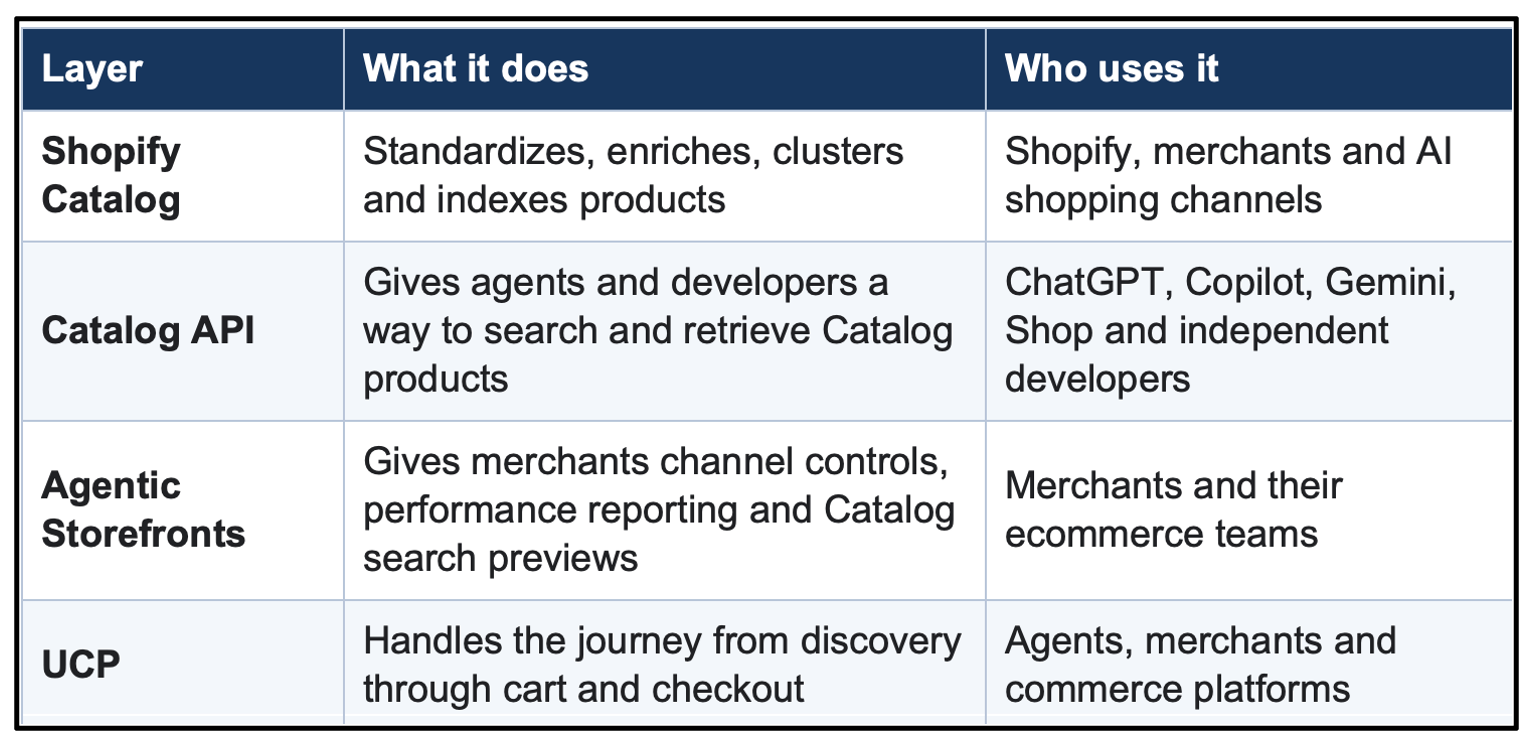
Think of Shopify Catalog as the core product database. The Catalog API is the access layer for that product data, Agentic Storefronts give merchants the controls and an user interface into what’s going on. For Agentic transactions, UCP is used for the transaction rails.
Shop Cat Explorer is your detailed view into the Catalog API. You are seeing exactly what shopify is surfacing to the agents.
Inside of the Shopify catalog, Shopify has spent nearly two years building a search index that now covers more than 1 billion products. Under the hood, Catalog does several things → (these are Shopify’s terms not mine):
Standardization: Catalog maps products into Shopify’s Standard Product Taxonomy.
Enrichment: Catalog infers attributes such as color, material, pattern, size type, age group, key features, technical specifications and value propositions.
Clustering: Catalog groups related listings and variants, including products sold across different stores. (Note: this is what I prefer to call canonicalization).
Freshness: Catalog keeps the product record connected to current price, inventory, variants and other commerce data.
Retrieval: It lets agents search for a product from natural language, look up a known product or retrieve current variant details.
Shopify’s engineering team has given a revealing look at the clustering solution. Catalog groups versions of the same real-world item under a Universal Product ID (UPID). Think of UPIDs as the equivalent of an ASIN in the Amazon world. Note: Sometimes Shopify uses UPI - Universal Product Identifier and other times UPID, we’re 99.9% sure they are interchangeable, but it’s quite inconsistent.
For example, you can see these in the Shop Cat Explorer- here I looked for a popular beauty product: “Olaplex 3” (use the Products slider):
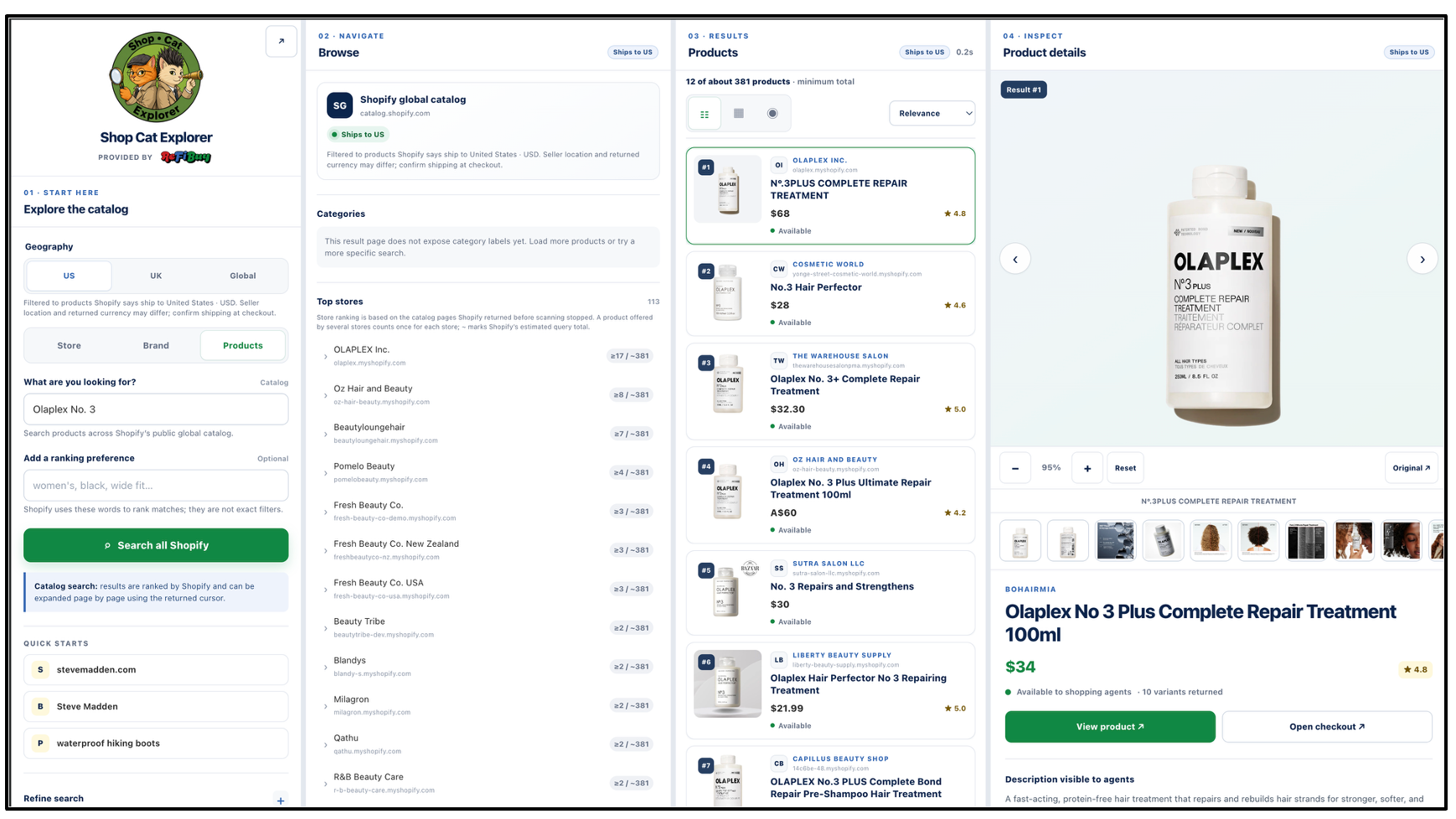
In Product Details Scroll down to variations. Here you’ll see in the variations something different than you’ve probably seen before→
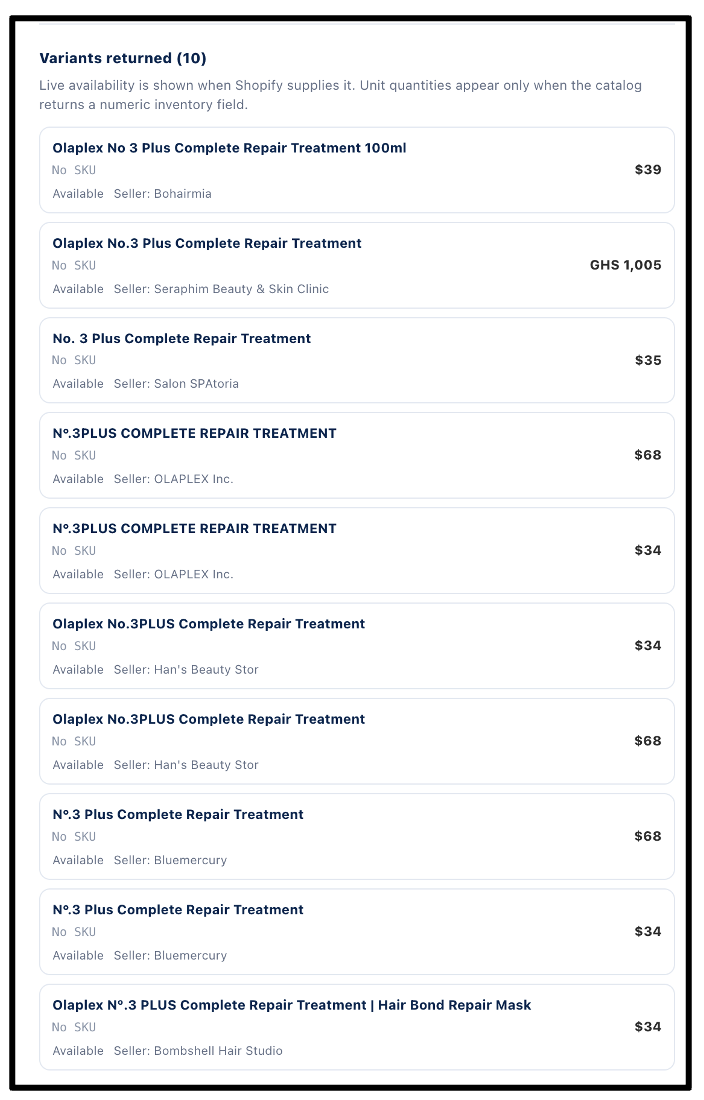
Notice how each variation has a different seller. This is Shopify’s canonicalization clustering at work. This is where the API stops, I am a bit concerned that it’s clustering things with wildly different prices (feels like a classic mis-canonicalization- the 3.4 and the 8.5oz being mixed accidentally), but without more information it’s hard to tell.
Merchant Controls
Our readers are merchants, and here’s what you want to know, what can you control→
Eligible products are generally included automatically; inclusion does not guarantee placement or ranking (the agent is the front-end, it decides what to do with the catalog data passed to it).
The Agentic dashboard lets merchants preview Catalog search, examine listing quality, manage channels, and review performance.
Catalog Mapping lets merchants select title, description, category, and grouping sources when custom metafields or conventions are used.
Some API fields are inferred by Shopify and can vary in accuracy; downstream AI channels control their final wording and ranking.
Merchants can disable Catalog access for third-party agentic channels, but cannot opt out of Shopify Catalog itself while retaining otherwise eligible public products.
Promoted placements can blend paid variants into Global Catalog results for approved developers.
Shopify Catalog and ACO
If we look at our 11 step Retailgentic ACO strategy steps:
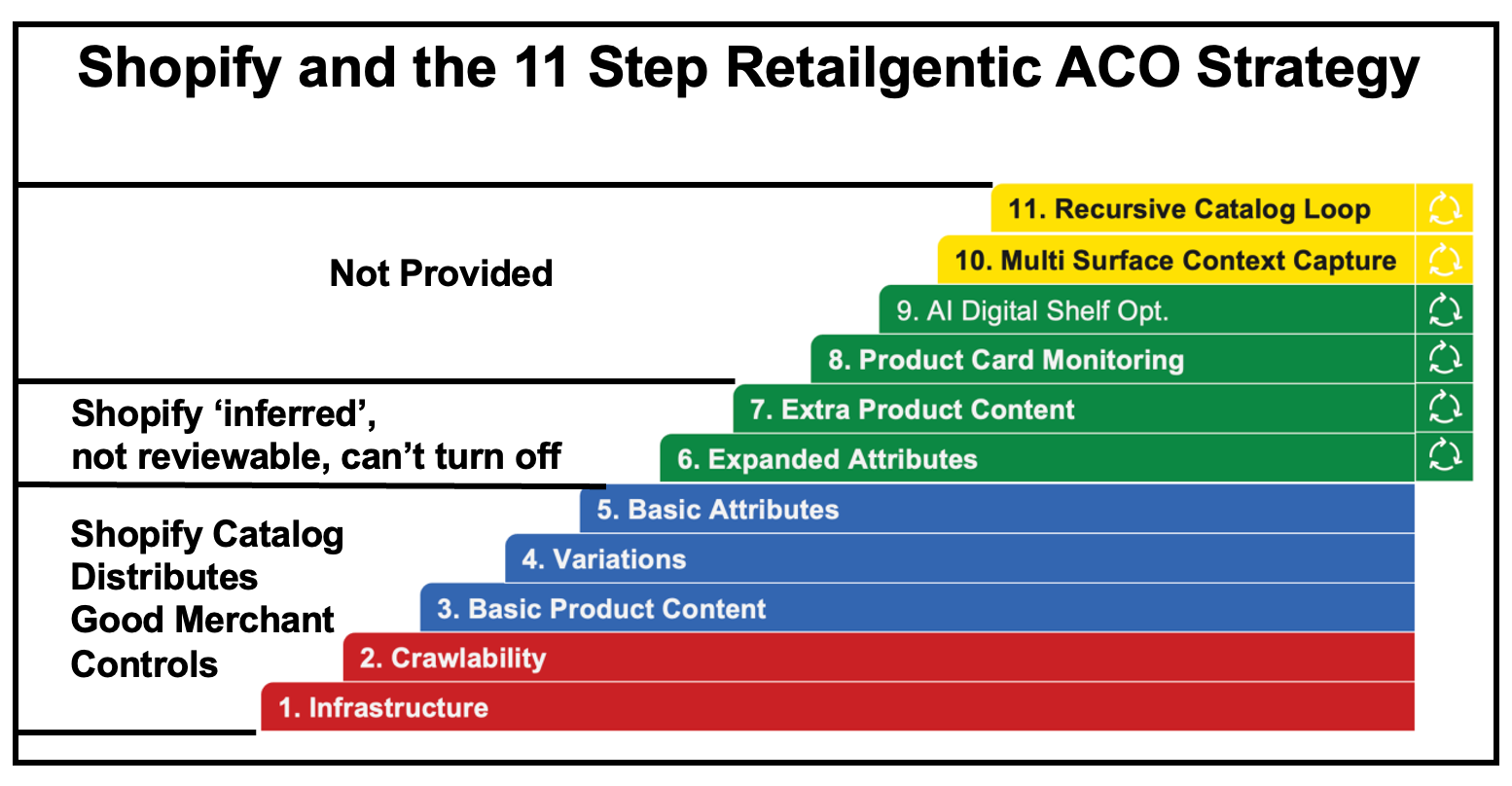
The Shopify platform gives you steps 1-5 ‘for free’. You have to provide the basic attributes and you can use merchant controls to optimize your basic attributes.
For steps 6 and 7, Shopify has made what I’d call at a ‘platform choice’ - they create extra product content for you, without your review and these cannot be turned off or changed. While this is probably the best decision for the 1.1m sellers, for the largest sellers, those top 15,000, if you want to control your own conversational attributes, review them for errors, this enrichment is not under your control.
Note there is no monitoring of how agents display your cards, product-card level canonicalization, external-to-shopify context capture.
Shopify Enrichment Level
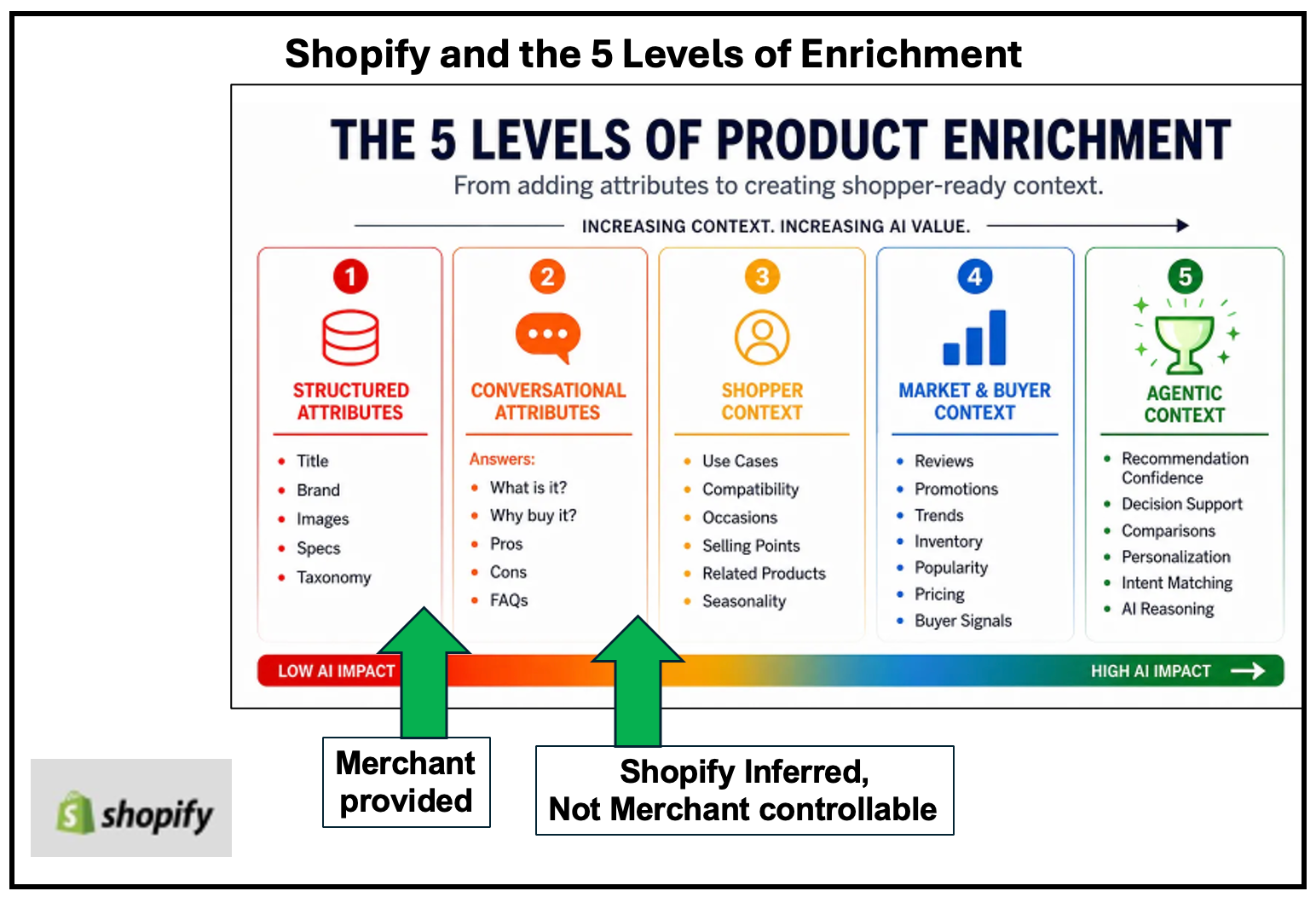
If you recall the 5 levels of product enrichment article where we introduced the five levels of product enrichment. Using the Shopify Catalog, you can get to Level 1 and the Shopify enrichment (they call it inferred enrichment) gets you to Level 2, but as said above, it is not merchant controllable at this time.
11 Shopify Catalog FAQs with Answers
We combed through questions we’ve been asked and the most common questions in larger Shopify store online communities and
Q1. Is Shopify Catalog the same as my Markets or B2B catalog?
No. Shopify Catalog is the global product-discovery layer used by Shop and AI shopping experiences. A Markets or B2B catalog controls the assortment and prices visible to particular countries, markets, companies, or company locations.
If you are working in Sales channels → Agentic, you are dealing with global Shopify Catalog distribution. If you are configuring country-specific assortments, wholesale prices, or company-location access, you are working with Markets/B2B catalogs.
Q2. Are my products included automatically?
Generally yes, when the store and products are eligible. The store must be on Starter or higher, not password-protected, compliant with Shopify policies, and in acceptable account standing. Products need a title, at least one image, a price above zero, an identifiable product URL, and publication to Online Store, Hydrogen, or Headless.
Unlisted, search-hidden, sensitive, or ineligible products are excluded. Account standing considers operating history, genuine sales, fulfillment, chargebacks, invoice payment, and unresolved compliance issues. Non-Shopify brands using the Agentic plan must also provide an external product URL.
B2B-only products, products requiring customer authentication, and password-protected products are generally excluded because current Agentic Storefronts support direct-to-consumer sales.
Q3. Where can my products appear, and does checkout happen inside the AI?
Depending on eligibility and channel availability, products can appear in Shop, ChatGPT, Microsoft Copilot, Google AI Mode, Gemini, Meta experiences, and smaller Catalog-powered shopping agents.
ChatGPT currently operates as a discovery and referral channel: customers complete their purchase through the merchant’s Shopify checkout in an in-app browser or a new tab. Microsoft Copilot, Google AI Mode/Gemini, and Meta can support Shopify-powered direct checkout where the channel and merchant are eligible and direct checkout is active.
Google and Meta product discovery are supplied through their respective Shopify sales-channel integrations rather than the same Catalog-access toggle used for ChatGPT and Copilot.
Q4. What data is shared, and does an AI receive my customer database?
Catalog-access channels receive product information such as titles, descriptions, images, prices, options, variants, and availability. They do not receive the merchant’s private admin information, general customer database, full order history, or orders from unrelated channels.
When a customer places an order through a direct-checkout channel, that channel receives the contact and delivery information required to process the order. Shopify’s supplemental terms authorize Shopify to process, index, combine, display, reproduce, and create derivative representations of merchant materials through participating channels.
API developers are separately prohibited from caching Catalog search results or downloading and reusing merchant images. That is intended to keep representations aligned with the merchant’s current price, availability, and presentation preferences.
Q5. Does “compression” alter my images, descriptions, or storefront?
Compression is a misinterpretation of some of the engineering team’s articles that talk about “compressing discovery” and “journey compression” (for the shopper). In this piece on LinkedIn called
Shopify Catalog functionality”, the Shopify engineer uses “complexity compression” - meaning that Shopify saves you all the complexity of DIY’ing all these attributes.
That being said, there are two aspects of the functionality that are out of the Merchant’s control that can introduce errors, not what I’d call compression though - they don’t ‘shrink the size of the catalog’ like compressing a file.
Inferred categories (sometimes called enrichment)
Clustering - If Shopify erroneously clusters your SKUs, that can introduce ‘up-stream’ problems for you.
I would not call these two areas ‘compression’, I’d call them AI generated information and mappings that have no human-in-the-loop and can introduce errors.
Q6. What if Shopify groups or describes my product incorrectly?
Open Sales channels → Agentic → Sources and review Shopify Catalog Mapping. All stores can map the Catalog title, description, and category to preferred product fields, metafields, or metaobjects.
Stores with unusual product structures can configure custom variant grouping using product attributes, metafields, title delimiters, and other conventions. This is useful when every color is maintained as a separate Shopify product but should appear as one configurable product in AI search. Shopify Combined Listings is used by default where it is already configured.
Merchants cannot guarantee every inferred field or downstream AI sentence. Shopify recommends that for persistent false grouping, capture the exact search query, affected product URLs, and the expected grouping, then provide those examples to Shopify Support. Alternatively, you can take over your channel feeds from Shopify and do ACO yourselves.
We recommend using our free Shop Cat Explorer to get a view of all these features so you can see if you find any errors in the Shopify inferred attributes or clustering for your products.
Q7. How do I improve my products’ AI ranking?
Use the search-preview feature in Sales channels → Agentic. It shows raw Shopify Catalog results and whether the store’s products reach the global top results for a query.
Shopify’s listing-quality indicators evaluate description completeness, image coverage, verified reviews, variant and option completeness, in-stock availability, readable option names, and store policies. Ranking also uses less controllable signals such as popularity, engagement, and brand recognition.
Individual AI platforms can re-rank Shopify’s output, so the preview is directional rather than a guarantee. Inclusion in Catalog is only eligibility; competitive visibility requires relevant, complete, trustworthy product information. Promoted placements may also be blended into Global Catalog results for approved developers.
Q8. Can I opt out?
Merchants cannot opt out of Shopify Catalog itself while retaining otherwise eligible public products, but they can control which third-party agentic channels receive Catalog access.
In Sales channels → Agentic, turn off Allow Shopify to manage for me. You can then disable global Catalog access, future automatic enrollment, or individual supported channels. Removal may take up to seven days. Disabling third-party access does not remove products from Shop (The Shop app) and does not prevent ordinary web crawlers from discovering a public product page.
To hide a specific product from Catalog, Shop, and search engines, use Unlisted status or the appropriate search-hidden setting. Changing robots.txt affects web crawlers, but it does not stop Catalog syndication to channels that remain activated.
Q9. How current are price and inventory data?
Shopify describes Catalog data as continuously updated and real-time, but the public materials do not provide a contractual freshness SLA measured in seconds or minutes.
Search defaults to available, sale-ready products. lookup_catalog retrieves current records for known products or varient identifiers, and get_product returns current variants, availability, seller details, and checkout links. Developers are prohibited from caching results or copying product images to their own servers.
The architecture should be materially fresher than periodic scraping or CSV feeds, but real-time should not be interpreted as a guarantee of zero propagation delay.
Q10. How do I know whether Catalog is producing sales?
The Agentic dashboard reports sales, orders, online-store sessions, online-store conversion, queries where products appeared, and queries where products failed to rank competitively.
Orders from supported AI channels appear in Shopify Admin with channel or referrer attribution. Shopify says merchants retain ownership of the customer relationship and post-purchase experience. Headless-store Agentic analytics are not yet available.
Merchants should separate AI answer-engine traffic from conventional organic search, compare conversion and average order value, and evaluate both total volume and per-session economics. Early AI traffic may be small while still carrying higher purchase intent.
Q11. Does Shopify Support the Q+A Functionality of ACP/UCP?
We’ve scoured the documentation and looked heavily through the raw data from Shop Cat Explorer and do not see evidence that Shopify has worked on this functionality at this point. They have something that looks kind of like UCP/Google conversational attributes, but have a different name (inferred product fields) and different individual fields than those recommended by Google.
We’ve found optimizing ACO via Q+A to be extremely powerful with measurable impact and something merchants should prioritize as they get more Agentic Commerce savvy.
Merchants will note that Shopify does have a merchant-managed answer functionality via the Knowledge Base App. These are store-level questions, we’re talking about product-level questions here. E.g. “What’s your return policy” is a store-level question vs. “Is this product safe for overnight application on my skin” is a sku-level FAQ.
Where to Learn More…
That’s a LOT on Shopify Catalog, we hope you’ve enjoyed this overview and connecting the tactical to the strategic. We also hope you find Shop Cat Explorer as helpful as we did to understand how all this works and ‘see’ it live and in action against your store, brands and products.
Also, to their credit, Shopify has published a TON of very detailed content around the Catalog, Catalog API, UCP, Agentic Commerce and all their capabilities. Here are the top items we used for this piece in our research:
Related Announcements and news
Agentic commerce for every developer: The Spring ’26 Edition - Public Catalog API access, multimodal search, richer product data, Shop sign-in, and developer monetization.
AI-native, developer-ready: Unpacking Winter ’26 Edition - The broader developer rollout of Shopify Catalog and the agentic commerce stack.
The agentic commerce platform: Shopify connects any merchant to every AI conversation - UCP, the Agentic plan, and Catalog availability for non-Shopify brands.
Millions of merchants can sell in AI chats - The March 2026 merchant rollout across ChatGPT and other AI channels.
Selling everything, everywhere, all at once: The Spring ’26 Edition - Merchant-facing Catalog, Agentic dashboard, analytics, and distribution announcements.
Five apps that show what Catalog API and UCP make possible - Examples of visual, contextual, conversational, and cross-merchant shopping experiences.
Engineering and analysis
Clustering billions of products for agentic commerce with Catalog API - Detailed architecture for product identity, clustering, precision and recall, LLM processing, and structured outputs.
AI-referred shoppers convert better and spend more - Shopify’s Q1 2026 data on AI traffic, conversion, average order value, and journey compression.
Millions of merchants speak UCP - A technical explanation of UCP and Catalog as complexity compression from Shopify product leader Ilya Grigorik.
Catalog API documentation
About Catalog interfaces - Global versus Storefront Catalog, tools, usage restrictions, saved catalogs, and promoted placements.
Global Catalog MCP reference - Global endpoint, search, lookup, get-product operations, inferred fields, and request shapes.
Storefront Catalog MCP reference - Product discovery scoped to a single Shopify storefront.
Global Catalog extension and filters - Shopify-specific filters, inferred metadata, availability, shipping, rating, and price tiers.
Agent profiles and UCP negotiation - Capability discovery and UCP profile requirements.
Authentication and rate limiting - Anonymous, signed, and token traffic tiers and their capabilities.
Discover products with Shopify Catalog - End-to-end developer example for Global Catalog search.
Storefront Catalog MCP now implements UCP - The April 2026 endpoint, tool-name, and schema migration.
Merchant documentation
Shopify Catalog overview - Definition, syndication behavior, optimization guidance, and ranking limitations.
Requirements for inclusion in Shopify Catalog - Store, product, publication, policy, and account-standing eligibility requirements.
Shopify Catalog and product discovery for Agentic Storefronts - Product mapping, crawler behavior, hiding products, discovery files, and B2B exclusions.
Mapping product-data sources for Shopify Catalog - Field mapping and custom variant-grouping controls.
Shopify Agentic Storefronts overview - Channels, checkout behavior, attribution, and customer relationship ownership.
Managing Agentic Storefronts - Channel controls, opt-outs, performance reports, search preview, and listing-quality signals.
Data sharing and privacy for Agentic Storefronts - Product and order information shared with AI channels and protected merchant data.
Agentic-plan setup for non-Shopify storefronts - Requirements and setup steps for brands using Shopify’s Agentic plan.
Optimizing your store for AI - Product-page, structured-data, FAQ, and Knowledge Base guidance.
Related Shopify catalogs
Catalogs for Shopify Markets - Developer overview of market and company-location catalogs.
Markets catalog management - Merchant guidance for market-specific products and pricing.
Admin GraphQL Catalog reference - The separate Admin API object used for Markets, B2B, publications, and pricing.
Do you think agentic commerce can support high-growth rates, above 30%, over the next 5 years for Shopify?
One detail in Shopify's own announcement decides whether small merchants get anything out of this. The 11 January 2026 post says the Universal Commerce Protocol lets agents carry discount codes, loyalty credentials, subscription billing cadence and selling terms such as final sale or pre-order timing through checkout, and that it works with any payment processor. For a shop with no developers, that is the gap between being listed and actually selling on its own terms. The Agentic plan opens Shopify Catalog to brands with no Shopify storefront. The post does not explain how Catalog ranks competing listings once everyone is in it.